Project: CommNet
“The AI-driven network for client communication.”
About Team : https://wiki.enovate-it.com/Teams/Team%20Spark
Project Description
The Client Communication Management Application is a multi-tenant platform designed to help businesses manage customer interactions through AI-powered communication channels.
It allows each client to onboard their projects, configure communication channels (Telegram, Email, etc.), integrate with preferred AI models (ChatGPT, Gemini, etc.), and leverage a knowledge base for context-aware responses.
The application provides:
- A dedicated client dashboard for project setup, knowledge base upload, and communication channel configuration.
- A customer-facing AI interface (chat page, Telegram bot, or email integration) where end-users can interact with the AI assistant.
- An admin dashboard to monitor, review, and override AI responses when necessary.
Uploaded project documents and external resources are indexed in a knowledge base powered by vector embeddings (Postgres pgvector or external vector DB). This enables retrieval-augmented generation (RAG), ensuring AI responses are accurate and project-specific.
The platform supports multiple AI connectors, enabling flexibility for businesses to choose the best model for their needs. Clients can seamlessly manage communication, while administrators maintain oversight and control over all conversations.
The system is built on a Python backend (FastAPI), PostgreSQL database, and integrates with external APIs for AI, messaging, email, and storage services.
System Architecture
Frontend
UI: ShadcnUI (TailwindCSS + RadixUI)
Build Tool: Vite
Routing: TanStack Router
Type Checking: TypeScript
Linting/Formatting: Eslint & Prettier
Icons: Lucide Icons, Tabler Icons (Brand icons only)
Client dashboard: onboarding, project setup, knowledge base upload, channel configuration
Customer-facing AI bot interface: chat page embedded in client’s site, Telegram, email, etc.
Admin dashboard: monitor conversations, override responses
Backend (Node.js)
- Core app framework: NestJs
- Authentication & Accounts: BetterAuth
- Project & Channel Management: Store client configs (Telegram bot keys, email SMTP creds, AI model choice)
- Message Orchestration: Routes queries → preprocess → AI model → knowledge base → return response
- Knowledge Base (MCP integration): Ingest docs, PDFs, Google Drive/OneDrive, index content, semantic search
- AI Connector Layer: Wrappers for ChatGPT, Gemini, and future LLMs
- Monitoring & Logging: Store all conversations, admin can review & edit
Database
- PostgreSQL: for structured data (users, projects, configs, logs)
- Vector DB: pgvector
AI / NLP
- Connector: OpenAI API (Gemini), Perplexity API, and pluggable LLMs
- Pre-/Post-processing pipeline: inject context, system prompts, etc.
- Retrieval Augmented Generation (RAG): option to fine-tune or use RAG with knowledge base
Communication Integrations
- Telegram Bot API: customer chats
- Email Gateway: SMTP + IMAP, or services like SendGrid
- Optional: WhatsApp Business API, Slack, Web widget
File Handling & Knowledge Base
- File parser: PDF, DOCX, TXT
- Cloud storage integration: Google Drive/Dropbox API for linked knowledge sources
- Embeddings generator: OpenAI embeddings, HuggingFace models
- Indexing service: store embeddings into Vector DB
Infrastructure
- Cloud deployment: AWS
- Containerization: Docker
- Background task runner: Celery / RQ for async jobs (e.g., doc parsing)
- Caching: Redis for messages and sessions
- CI/CD: GITLAB
System Architecutre Diagram
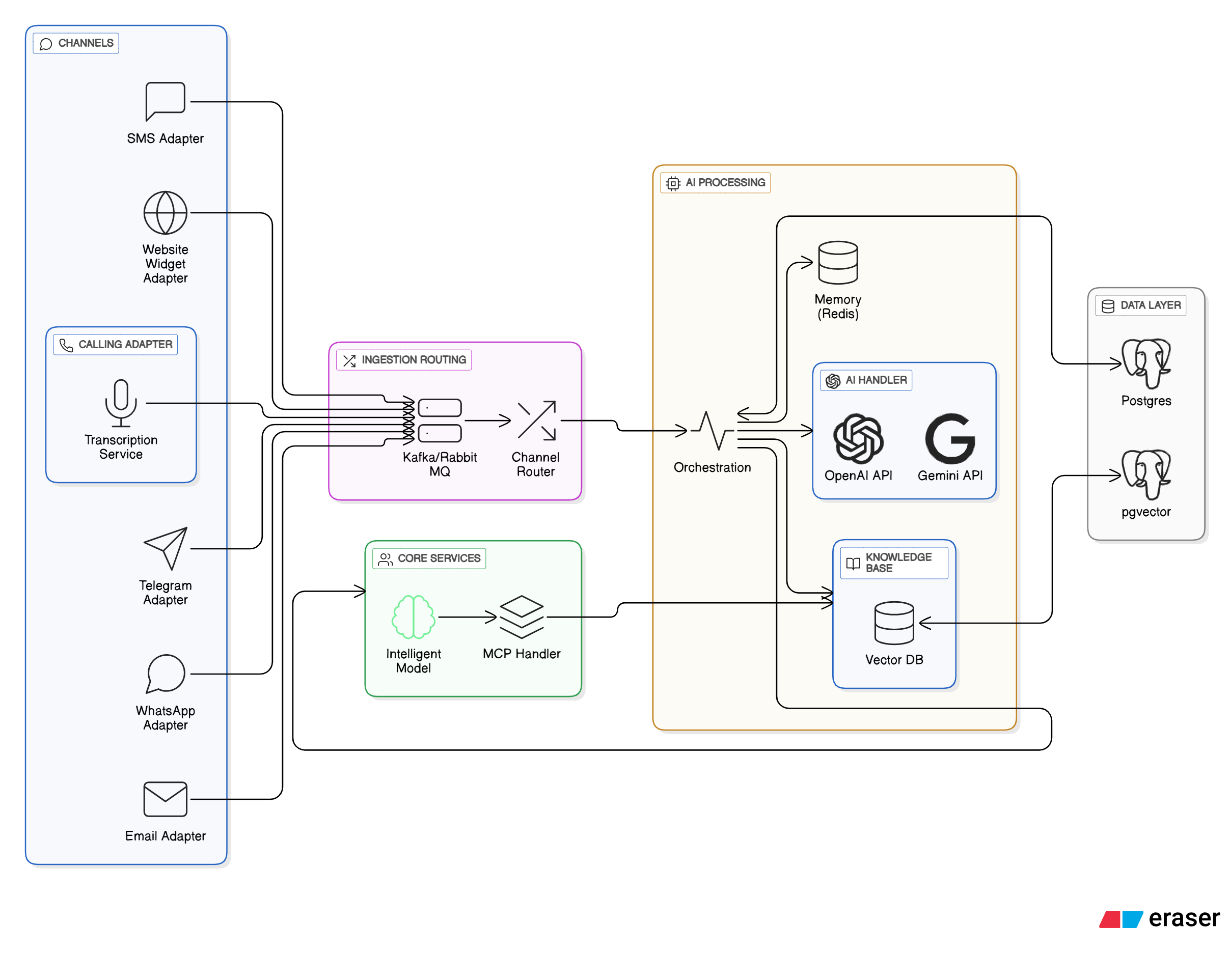
flowchart TB

    %% SECTION: External
    subgraph EXT[External Environment]
        Customer[Customer (End User)]
    end

    %% SECTION: Comnet Platform
    subgraph COM[Comnet Platform]
        Reg[User Registration & Auth Service]
        TenantMgr[Workspace / Tenant Manager]
    end

    %% SECTION: Workspace Layer
    subgraph WS[Workspace Layer (per Client)]
        subgraph WM[Workspace Modules]
            Users[User & Group Management]
            Clients[Client Records]
            Tasks[Task Management Module]
            KB[Knowledge Base]
            Analytics[Reports & Analytics]
        end
        Channels[Channel Integrations (Email, Telegram, SMS)]
        Agents[Channel Agents]
    end

    %% SECTION: Core System
    subgraph CORE[Core Processing Layer]
        MCP[MCP Server (Message Coordination Processor)]
        AIHub[AI Model Router]
        subgraph AI[AI Services]
            ChatGPT[(ChatGPT Model)]
            Gemini[(Gemini Model)]
        end
    end

    %% Data Stores
    DB[(Database Storage)]
    Logs[(Conversation Logs)]

    %% External Connections
    Customer <--> Channels
    Channels --> Agents
    Agents --> MCP
    MCP --> AIHub
    AIHub --> ChatGPT
    AIHub --> Gemini
    AIHub --> KB
    KB --> MCP
    MCP --> Tasks
    MCP --> Agents
    Tasks --> Users
    Users --> Analytics
    Agents --> Logs
    WS --> DB

    %% Comnet relationships
    Reg --> TenantMgr
    TenantMgr --> WS

    %% Labels
    classDef external fill:#f5f5f5,stroke:#999,stroke-width:1px;
    classDef service fill:#e0f7fa,stroke:#0288d1,stroke-width:1px;
    classDef ai fill:#fff3e0,stroke:#fb8c00,stroke-width:1px;
    classDef storage fill:#f1f8e9,stroke:#7cb342,stroke-width:1px;
    classDef core fill:#fce4ec,stroke:#ad1457,stroke-width:1px;
    class COM,WS,CORE service;
    class AI,AIHub ai;
    class DB,Logs,KB storage;
    class Customer external;
1. Tech Stack
- Backend (Node.js)
- FastAPI (async, lightweight, API-first approach) or Djangofeatures).
- Database
- PostgreSQL (perfectly suited for multi-tenant, relational data storage).
- Frontend
- ShadcnUI , vite
- Admin dashboard + Client dashboard.
- AI/ML Integrations
- OpenAI API / Perplexity API / Custom AI connectors.
- Knowledge Base Indexing (e.g., LangChain + Vector DB like Postgres pgvector).
- MCP Server (for tool orchestration + context passing).
- Communication Channels
- Telegram Bot API integration.
- Email integration (IMAP/SMTP or services like SendGrid/Mailgun).
- Infrastructure
- Docker for containerization.
- Nginx / Traefik for reverse proxy.
- Optional: Kubernetes for scaling.
2. Core Modules & Features
🔹 Client Onboarding
- Form to capture client + project details.
- Generate dedicated project page for embedding AI bot.
- Multi-tenant user management (each client = tenant).
🔹 Communication Channels
- Configurable options for each client:
- Telegram bot setup.
- Email inbox setup.
- Future: WhatsApp, Slack, etc.
🔹 AI Model Connector
- Ability to select which AI model:
- ChatGPT (OpenAI).
- Perplexity.
- Others (pluggable architecture).
- Standardized response pipeline regardless of model.
🔹 Knowledge Base
- Upload project docs (PDF, DOCX, TXT).
- Import from Drive links / Notion / Confluence.
- Store embeddings in pgvector (Postgres extension).
- Retrieval-Augmented Generation (RAG) for query responses.
🔹 Query Processing
- Customer submits query → AI pipeline:
- Normalize input.
- Retrieve context from Knowledge Base.
- Feed context + query to chosen AI model.
- Return AI response.
- Option for admin override & monitoring.
🔹 Monitoring & Admin Portal
- View all conversations per client/project.
- Override/edit AI responses.
- Track usage per channel/model.
- Analytics & logs.
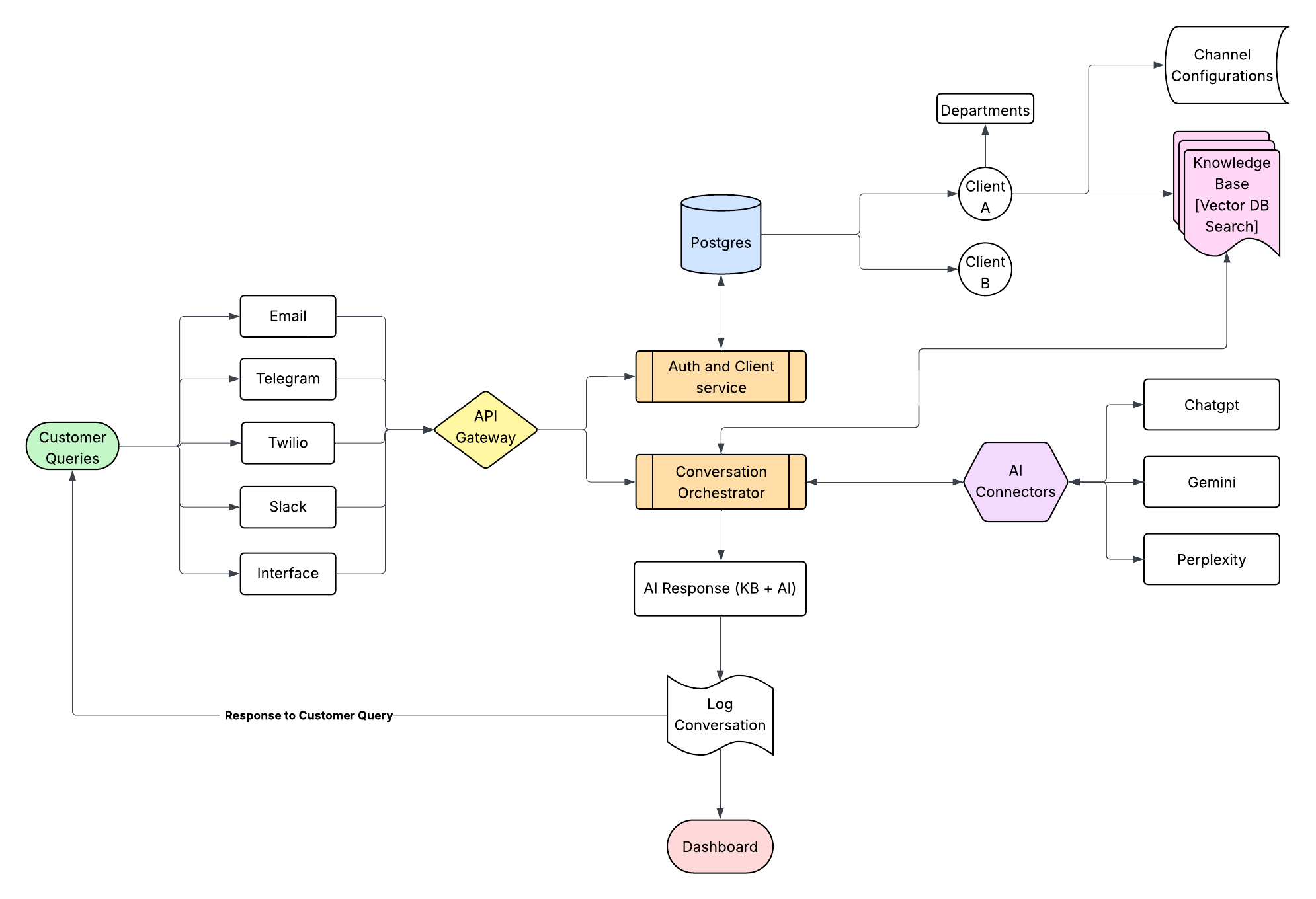
Dataflow Diagram
3. Database Design (Postgres)
Tables (example):
clients→ Client info (name, domain, etc.)projects→ Linked to clients (stores project metadata).channels→ Configured communication channels.ai_models→ Available model connectors.knowledge_base→ Documents & embeddings.queries→ User queries & responses.users→ Client admins & internal admins.
Use pgvector for embeddings storage and similarity search.
4. External Integrations
- Telegram Bot API → Webhook for messages.
- Email API → IMAP/SMTP or SendGrid.
- AI APIs → OpenAI, Perplexity, etc.
- Storage → AWS S3 / GCP Storage for uploaded files.
- Drive APIs → Google Drive API (for fetching docs).
- Authentication → JWT or OAuth2 (multi-tenant).
5. Deployment & Scaling
- Containerize with Docker.
- CI/CD (GitHub Actions / GitLab CI).
- Cloud hosting (AWS/GCP/Azure/DigitalOcean).
- Use Postgres + pgvector for persistence + semantic search.
- Caching layer (Redis) for session storage & rate limiting.
Sequence Diagram - Click to View
sequenceDiagram
    autonumber

    %% ===== PARTICIPANTS =====
    participant Client as 🧑 Client (Workspace Owner)
    participant Comnet as 🌐 Comnet Portal
    participant WS as 🏢 Workspace Service
    participant Channel as 💬 Communication Channel (Email/Telegram)
    participant Agent as 🤖 Channel Agent
    participant MCP as 🧠 MCP Server
    participant AI as 🧩 AI Model Router (ChatGPT/Gemini)
    participant KB as 📚 Knowledge Base Service
    participant Task as 📋 Task Service
    participant DB as 🗄️ PostgreSQL Database

    %% ===== REGISTRATION & WORKSPACE CREATION =====
    Client->>Comnet: Register on Comnet
    Comnet->>DB: INSERT client credentials and org record
    Comnet-->>Client: Return registration success + auth token

    Client->>WS: Create Workspace
    WS->>DB: INSERT workspace details linked to client
    WS-->>Client: Workspace created successfully

    %% ===== WORKSPACE CONFIGURATION =====
    Client->>WS: Add Users, Groups, Clients
    WS->>DB: INSERT user/group/client records
    Client->>KB: Upload KB documents / FAQs / SOPs
    KB->>DB: INSERT KB entries + embeddings
    KB-->>Client: KB indexed successfully
    Client->>WS: Configure Communication Channels (Email, Telegram, SMS)
    WS->>DB: UPDATE workspace with channel settings
    WS-->>Client: Channel configuration saved

    %% ===== AI & MCP CONFIGURATION =====
    Client->>AI: Configure AI Models (ChatGPT, Gemini)
    AI->>DB: INSERT model config (API keys, version, workspace linkage)
    AI-->>Client: Model configuration confirmed

    Client->>MCP: Configure MCP routing rules (channel–AI mapping)
    MCP->>DB: INSERT routing and message handling configuration
    MCP-->>Client: MCP configured successfully

    Note over Client,DB: Workspace setup completed (Users, Channels, AI, MCP, KB)

    %% ===== CUSTOMER COMMUNICATION FLOW =====
    Note over Channel,Agent: Customer sends query via selected channel
    Channel->>Agent: Receive inbound message
    Agent->>MCP: Forward message + workspace/channel context
    MCP->>DB: SELECT workspace configuration + routing rules
    MCP->>AI: Route message to appropriate AI model

    %% ===== AI PROCESSING & KB INTERACTION =====
    AI->>KB: Request contextual KB data
    KB->>DB: SELECT related knowledge entries
    DB-->>KB: Return matching KB results
    KB-->>AI: Provide relevant context
    AI-->>MCP: Return AI-generated response + detected intent

    %% ===== TASK MANAGEMENT =====
    alt Actionable Intent Detected
        MCP->>Task: Create new task (assigned to group)
        Task->>DB: INSERT new task entry
        Task-->>MCP: Task creation success
    else Informational Only
        MCP-->>Agent: Return AI response for delivery
    end

    %% ===== RESPONSE DELIVERY =====
    MCP->>Agent: Send AI response payload
    Agent->>Channel: Deliver reply back to customer
    Channel-->>Customer: Message displayed

    %% ===== KNOWLEDGE UPDATE (Learning Loop) =====
    alt New Insight Identified
        AI->>KB: Suggest KB entry addition/update
        KB->>DB: INSERT or UPDATE KB record
        KB-->>AI: Update acknowledged
    end

    %% ===== LOGGING & ANALYTICS =====
    MCP->>DB: INSERT message, AI response, metadata
    Task->>DB: UPDATE task progress or completion
    WS->>DB: UPDATE analytics data (response time, task count, sentiment)
    DB-->>WS: Return metrics for dashboard display

    Note over DB: PostgreSQL stores all entities (clients, workspaces, channels, AI configs, KB, tasks, analytics)
Future Scope
The platform is designed with scalability in mind, allowing integration of new features and channels to enhance client communication and management. Planned future improvements include:
1. Additional Communication Channels
Meeting Integrations
- Integration with platforms like Zoom, Google Meet, and Microsoft Teams.
- AI-powered meeting notes, summaries, and action items.
Phone Call Channels
- Integration with telephony services (e.g., Twilio, Vonage).
- AI-powered call transcription, sentiment analysis, and automated follow-up responses.
2. Ticketing & Workflow Management
Jira / Trello / Asana Integrations
- Automatic ticket creation from client queries.
- Linking AI conversations to tasks and workflows.
- Syncing client issues directly into project management tools.
Internal Ticketing System
- Native ticket creation and tracking within the platform.
- Escalation workflows and admin assignment for unresolved queries.
3. Advanced AI Features
Sentiment & Intent Analysis
- Understanding customer tone and urgency for better prioritization.
Personalized AI Responses
- AI models trained on client-specific style guides and communication tone.
4. Analytics & Insights
- Advanced reporting on client queries, response times, and AI performance.
- Predictive analytics for identifying recurring issues or potential churn risks.
- Exportable insights for stakeholders.
5. Enterprise Readiness
- Multi-language support for global clients.
- Role-based access control with fine-grained permissions.
- Audit logging for compliance and security.