Blame
| 298c40 | Melisha Dsouza | 2026-02-25 19:40:27 | 1 | # **Planning (PLAN)** |
| 2 | ||||
| 3 | _(Approval of the PLAN indicates an understanding of the purpose, goals, scope, and content described in this deliverable. By signing this document, each individual agrees to the defined roles, responsibilities, and business logic of the proposed subsystems. Furthermore, Test Planning, Detailed Design, and related life cycle activities should be initiated, and the necessary resources committed as outlined in the Charter document.)_ |
|||
| 4 | ||||
| 5 | **Document Revision History** |
|||
| 6 | ||||
| 7 | | Version | Date | Change Information | Author | Approver | |
|||
| 8 | | ------- | ---- | ------------------ | ------ | -------- | |
|||
| 9 | | V1.0 | Feb 24, 2026 | Initial Draft | Melisha Dsouza | Pooja Thorat | |
|||
| 10 | ||||
| 11 | ### **1. Introduction** |
|||
| 12 | Before commencing any project, the first activity an organization needs to perform is project planning. Any experienced project manager understands the significance of a well-structured plan. A carefully prepared project plan considers all critical aspects such as requirement understanding, timelines, resource availability, and risk analysis. |
|||
| 13 | ||||
| 14 | This ensures that the project team has a clear roadmap to follow during execution. The plan serves as both a guidance document and a reference point throughout the project lifecycle, helping to manage scope, allocate resources efficiently, and minimize risks. |
|||
| 15 | ||||
| 16 | ### **2. Purpose, Goals, and Objective** |
|||
| 17 | The objective of project planning is to draw a blueprint for the project. The careful and detailed planning helps us to reduce risk and, in turn, uncertainty in any given project. In a meticulously planned project, the project planner attempts to make a provision for potential occurrences of uncertainties in advance. Project planning enables project managers to translate project requirements into a Work Breakdown Structure (WBS), task list, Gantt charts, resource assignment, and risk register, etc. |
|||
| 18 | ||||
| 19 | ### **3. Scope** |
|||
| 20 | Scope involves getting the information required to start a project, and the features the product would have that would meet its stakeholders’ requirements. It is important to define a clear project scope at the beginning of the project to avoid scope creep. |
|||
| 21 | ||||
| 22 | In the planning, the scope is defined in two distinct ways, |
|||
| 23 | ||||
| 24 | 1. **Project Scope:** "The work that needs to be accomplished to deliver a product, service, or result with the specified features and functions”.The project scope is more work-oriented (the hows). Below are some general aspects of the Project scope that can be defined in the plan according to project needs. |
|||
| 25 | * Detailed Planning, which will include, |
|||
| 26 | * Time Bond |
|||
| 27 | * Deliverables |
|||
| 28 | * Resource Planning |
|||
| 29 | * Budget Planning |
|||
| 30 | * Task Planning |
|||
| 31 | * Design Documents |
|||
| 32 | ||||
| 33 | 2. **Product Scope:** "The features and functions that characterise a product, service, or result."Product Scope is more oriented toward functional requirements (the whats). Below are some general aspects of the Product scope that can be defined in the plan according to product and customer needs. |
|||
| 34 | * Achievement of the requirements defined in the Approved SRS |
|||
| 35 | * Quality of the product in terms of, |
|||
| 36 | * Performance |
|||
| 37 | * Ease of use |
|||
| 38 | * Size |
|||
| 39 | * Looks and features |
|||
| 40 | * Durability |
|||
| 41 | * Functioning |
|||
| 42 | * Quantity of the product |
|||
| 43 | * Technologies Being Used |
|||
| 44 | ||||
| 45 | ### **4. Policies** |
|||
| 46 | Enovate IT Outsourcing is committed to establishing reasonable plans for managing software projects to deliver high-quality products and services. The purpose of the Project Planning policy is to ensure that Enovate IT Outsourcing consistently develops and documents: estimates for work to be performed; necessary, agreed-upon commitments from affected groups and individuals; and a plan to perform the work. |
|||
| 47 | ||||
| 48 | For each qualifying project, the Project Manager establishes, according to a documented procedure and in cooperation with other members of Enovate IT Outsourcing, a Project Plan document. Other impacted members of the Leadership Team within the department review and approve the subsequent Project Plan, and the Enovate IT Outsourcing director reviews the external (to the department) commitments. In addition, any external group affected by the size, effort, or cost estimates, schedule, or other commitments of the project will be asked to review that section of the Plan. |
|||
| 49 | The Project Plan covers several areas, including estimates of the software project’s effort and cost, the size of the software work product, critical computer resources, schedule with milestones and reviews, and an assessment of the software project’s risks. The Project Plan is maintained and controlled as a living document that reflects the current state of a project’s status. |
|||
| 50 | ||||
| 51 | Enovate It outsourcing management provides resources to the Project Manager(s) for creating the Project Plan document and conducting regular reviews of progress, as well as providing the necessary support to establish and maintain the project planning efforts. |
|||
| 52 | ||||
| 53 | ### **5. Work Product** |
|||
| 54 | A work product may begin as an analysis made during the development of a project, creating a type of proposal for the project that a company cannot deliver until the project has received approval. Companies use work products to provide information to current stakeholders and potential investors. Types of information available in a work product might include prototypes, presentations, recorded discussions, diagrams, and status reports. The organisation can also use the work product as a source of information while the project progresses. |
|||
| 55 | ||||
| 56 | - **The work product of the Enovate for PLAN is,** |
|||
| 57 | * **Project Plan**: A documented Plan |
|||
| 58 | * **Task list and Plan**: A Task list is a list of tasks and plans that will include resources, timelines, priorities, and estimations, which will be maintained in the Jira tool. |
|||
| 59 | ||||
| 60 | ### **6. References** |
|||
| 61 | ||||
| 62 | | Process Elements | File Name or Reference | |
|||
| 63 | | ---------------- | ----------------------------- | |
|||
| 64 | | Documents | Procedure Document | |
|||
| 65 | | Documents | Project Charter | |
|||
| 66 | | Checklist | Project Kickoff Checklist | |
|||
| 67 | | Checklist | Project Plan Checklist | |
|||
| 68 | | Plan | Project Plan | |
|||
| 69 | | Plan | Release Plan | |
|||
| 70 | | Plan | Test Plan | |
|||
| 71 | ||||
| 72 | ### **7. Records of PLAN** |
|||
| 73 | Gitlab Address for Documents: |
|||
| 74 | ||||
| 75 | | Record | Where to get? | |
|||
| 76 | | ------------------------------------------------------- | -------------------------------------- | |
|||
| 77 | | Procedure Document | Process Area_PLAN | |
|||
| 78 | | Project Charter | Process Area_PLAN | |
|||
| 79 | | Skills Matrix | Process Area_PLAN | |
|||
| 80 | | Project Kickoff Checklist | Process Area_PLAN | |
|||
| 81 | | Project Plan Checklist | Process Area_PQA | |
|||
| 82 | | Project Plan | Process Area_PLAN | |
|||
| 83 | | Release Plans | Process Area_PLAN | |
|||
| 84 | | Test Plans | Process Area_PLAN | |
|||
| 85 | | Task List and Plan | Jira tool | |
|||
| 86 | | Estimated Vs Actual | Process Area_EST | |
|||
| 87 | | Work Products Checklist | Process Area_PQA | |
|||
| 88 | | Defined Scope | Project Plan Dcument_Process Area_PLAN | |
|||
| 89 | | Stakeholder Analysis Matrix according to process areas | Process Area_PLAN | |
|||
| 90 | | Configuration Management Plan | Process Area_CM | |
|||
| 91 | | Audit Plans and Reports | Process Area_PQA | |
|||
| 92 | ||||
| 93 | **Roles and Responsibilities** |
|||
| 94 | ||||
| 95 | | Roles | Responsibilities | |
|||
| 96 | | ---------------------------------- | ---------------- | |
|||
| 97 | | Project Owner | Conducts an Initial meeting<br>Prepares Quotations and agreements for the project. | |
|||
| 98 | | Business Analyst / Project Coordinator | Prepare Project Charter<br>Communicates and resolves any customer-related issues.<br>Record MOM<br>Help PM make the Project Plan<br>Prepare Release Plan<br>Review Test Plan<br>Ensure the successful delivery of the project | |
|||
| 99 | | Quality Analyst | Prepare test Plan | |
|||
| 100 | | Team Leader | Understand the Project Plan<br>Prepare task list<br>Allocate task list to Resources<br>Update estimated hours and dates in task allocation, and make sure it will fill the project plan’s needs<br>To help the developer with critical technical issues<br>To ensure delivery on given timelines according to release plans<br>Record MOM<br>Keep the PM informed of any changes required in the plan and any issues encountered by the team members. | |
|||
| 101 | | Project Manager | Prepare resource plan (Comes under detailed project plan)<br>Design Document review (HLD, LLD, design doc, etc.)<br>Communicates and resolves the issue escalated by the project team.<br>Monitors the project progress and keeps the PC/BA/customer informed.<br>Periodically seeks customer feedback<br>Record MOM | |
|||
| 102 | | Developer | Understand the Project plan and project needs | |
|||
| 103 | | Process Quality Assurance Manager | Prepare Audit Plan<br>Maintain Audit reports<br>Assure the quality of the process | |
|||
| 104 | | Configuration Manager | Prepare a CM plan | |
|||
| 105 | | PQA | Prepare Audit Plan | |
|||
| 106 | ||||
| 107 | ### **9. Process Flow and Description** |
|||
| 108 | ||||
| 109 | #### **Part 1-Basic Project Flow** |
|||
| 110 | ||||
| 111 | ```mermaid |
|||
| 112 | flowchart TD |
|||
| 113 | ||||
| 114 | A[PLAN] |
|||
| 115 | ||||
| 116 | B[Project Owner] |
|||
| 117 | C[Conduct initial meeting with PM and BA <br> Prepare agreement of the project] |
|||
| 118 | ||||
| 119 | E[BA] |
|||
| 120 | F[Prepare Project Charter] |
|||
| 121 | G[Prepare Release Plans] |
|||
| 122 | ||||
| 123 | H[PM] |
|||
| 124 | I[Prepare Project Plan] |
|||
| 125 | ||||
| 126 | J[CM] |
|||
| 127 | K[Prepare CM Plan] |
|||
| 128 | ||||
| 129 | L[PQA] |
|||
| 130 | M[Prepare Audit Plan] |
|||
| 131 | ||||
| 132 | N[QA] |
|||
| 133 | O[Prepare Test Plan] |
|||
| 134 | ||||
| 135 | R[Roles: Project Owner, PM, BA, PQA, CM, QA] |
|||
| 136 | ||||
| 137 | A --> B |
|||
| 138 | B --> C |
|||
| 139 | C --> H |
|||
| 140 | ||||
| 141 | C --> E |
|||
| 142 | E --> F |
|||
| 143 | F --> G |
|||
| 144 | I --> G |
|||
| 145 | ||||
| 146 | H --> I |
|||
| 147 | ||||
| 148 | I --> J |
|||
| 149 | J --> K |
|||
| 150 | ||||
| 151 | I --> L |
|||
| 152 | L --> M |
|||
| 153 | ||||
| 154 | I --> N |
|||
| 155 | N --> O |
|||
| 156 | ``` |
|||
| 157 | ||||
| 158 | **Description: Basic Project Flow** |
|||
| 159 | ||||
| 160 | - The project Owner, along with the senior management, forms the Project Initiation Group (PIG). Roles and Responsibilities of the project are assigned to the PIG. |
|||
| 161 | - The project manager should prepare a detailed project plan which should cover, |
|||
| 162 | * Resource Plan |
|||
| 163 | * Project Delivery Plan |
|||
| 164 | * Task Plan |
|||
| 165 | * Data Management Plan |
|||
| 166 | * Training/KT Plan |
|||
| 167 | * Project Test Plan |
|||
| 168 | * Adopted project Life cycle or approach |
|||
| 169 | * Communication Plan |
|||
| 170 | * Transition Plan |
|||
| 171 | * Documentation Delivery Plan |
|||
| 172 | * Review Plan |
|||
| 173 | * Change in requirements and new requirements management Plan |
|||
| 174 | * Issue Management Plan |
|||
| 175 | * Risk Management Plan |
|||
| 176 | * Process Tailoring Plan |
|||
| 177 | * Close-Out Plan |
|||
| 178 | - A Business Analyst should prepare a **project charter** and **release plans** based on the project delivery plan. |
|||
| 179 | - **Configuration Manager** should prepare the **CM plan** and share it with the required stakeholders. |
|||
| 180 | - A **Quality Analyst** should prepare a test plan based on the project and release plans |
|||
| 181 | - **Process Quality Assurance** should prepare **audit plans** to ensure the process and share them with the required stakeholders. |
|||
| 182 | - The Project Manager should **identify** or **define the software development lifecycle** |
|||
| 183 | - The **manager** should derive **estimation plans**. |
|||
| 184 | ||||
| 185 | ### **10. Project Life Cycles** |
|||
| 186 | ||||
| 187 | ### **Iterative Life Cycles** |
|||
| 188 | ||||
| 189 | 1. **Iterative Project Life of Enovate/Agile Life Cycle** |
|||
| 190 | ```mermaid |
|||
| 191 | flowchart TD |
|||
| 192 | ||||
| 193 | A[Start] --> B[**1.Initial Phase**] |
|||
| 194 | B --> C[SRS and Problem Statement] |
|||
| 195 | C --> D[**2.Planning Phase**] |
|||
| 196 | D --> E[Detailed Planning, Estimation and Scheduling] |
|||
| 197 | E --> F[**3.Execution Phase**] |
|||
| 198 | F --> G[Development Management and Monitoring] |
|||
| 199 | G --> H[**4.Project Closure Phase**] |
|||
| 200 | H --> I[Review and Successful Delivery] |
|||
| 201 | ||||
| 202 | I --> J[Next Iteration] |
|||
| 203 | L --> B |
|||
| 204 | J --> K[No] |
|||
| 205 | J --> L[Yes] |
|||
| 206 | K --> N[End] |
|||
| 207 | ``` |
|||
| 208 | ||||
| 209 | 3. Software Prototyping Model |
|||
| 210 | Software prototyping activity of creating prototypes of software applications that are incomplete versions of a software program being developed. |
|||
| 211 | ||||
| 212 | The prototype model is generally used when the requirements are unclear. It is used when the customer is unclear about the details of the input, process and output needs of the software. |
|||
| 213 | ||||
| 214 | **A prototype is a toy implementation of the system.** |
|||
| 215 | ||||
| 216 | ```mermaid |
|||
| 217 | flowchart LR |
|||
| 218 | ||||
| 219 | A[Requirement Gathering] --> B[Quick Design] |
|||
| 220 | ||||
| 221 | B --> C[Build Prototype] |
|||
| 222 | ||||
| 223 | C --> D[Evaluate] |
|||
| 224 | ||||
| 225 | D --> E[Refine Prototype] |
|||
| 226 | ||||
| 227 | E --> B |
|||
| 228 | ||||
| 229 | E --> F[Product] |
|||
| 230 | ``` |
|||
| 231 | ||||
| 232 | - **Requirement gathering:** Understanding the very basic product requirements, especially in terms of the user interface. |
|||
| 233 | - Quick design: After requirement gathering, a quick design is made that is work on the flow diagram, languages, etc. |
|||
| 234 | - **Building prototype:** These basic requirements are showcased and user interfaces are provided. This prototype gives some look and feels to the customer in what will be an exact product. |
|||
| 235 | - **Evaluate / review of the prototype:** The Prototype developed is then presented to the customer and the other stakeholder in the project. Feedback is collected and used for further enhancements. |
|||
| 236 | - **Refine prototype:** Feedback and comment are discussed and some negotiations happen with a customer based on time and budget constraints. The changes accepted again incorporated in the new prototype. This cycle repeats until customer expectations are met. |
|||
| 237 | - **Product**: After repeating the above steps, finally, the product is developed, meeting user expectations. |
|||
| 238 | ||||
| 239 | **When to use the Prototyping Model?** |
|||
| 240 | - It is usually built using several "shortcuts". The shortcuts might involve using inefficient, inaccurate, or dummy functions. |
|||
| 241 | - **Example**: In a process, we can show a table-look-up instead of showing actual computation. |
|||
| 242 | - In this prototyping, quick iterations are planned and quick modeling occurs. |
|||
| 243 | - The prototype is implemented and then accessed by customers or users for their feedback to refine requirements for the software. |
|||
| 244 | - That prototyping is turned and iterated until customer satisfaction. |
|||
| 245 | ||||
| 246 | 5. Software Prototyping Model |
|||
| 247 | ||||
| 248 | The spiral model is another iterative software development life cycle which is greatly used for high level and long term project as well as high-level risk analysis. |
|||
| 249 | ||||
| 250 | To use this model an experienced and skilled team required |
|||
| 251 | ||||
| 252 | 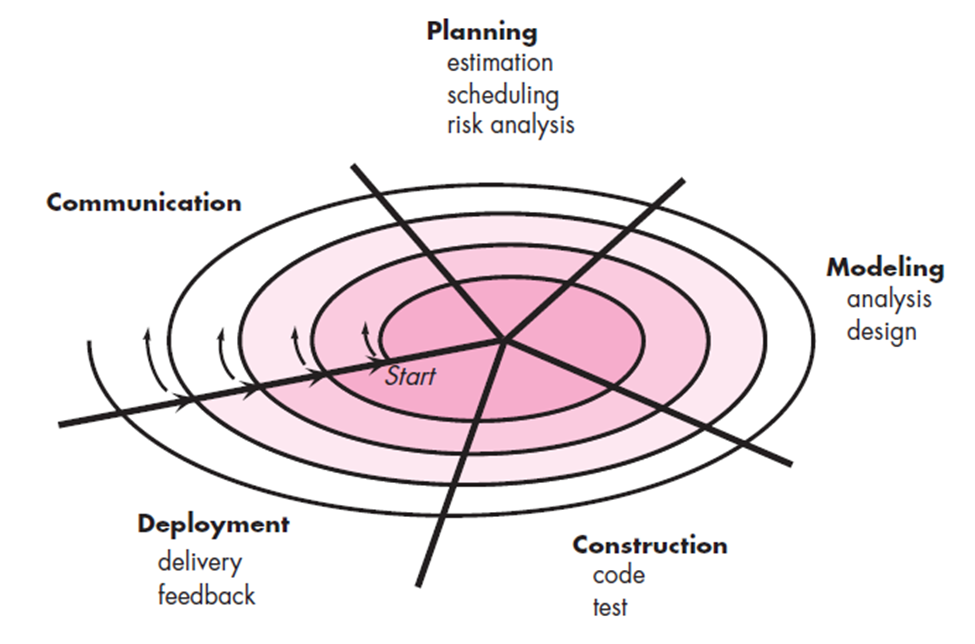 |
|||
| 253 | 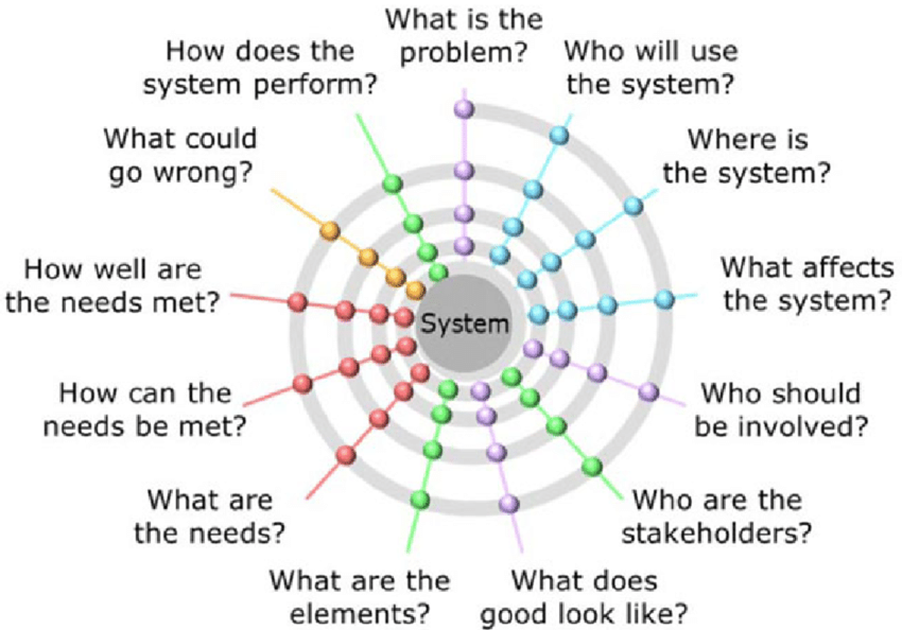 |
|||
| 254 | ||||
| 255 | **Why to use Spiral Model?** |
|||
| 256 | - This model improves the avoidance of risk |
|||
| 257 | - This model is very useful for choosing a methodology for a software iteration |
|||
| 258 | - This model can associate other methodologies like Waterfall, Prototyping, and Incremental methodologies. Suppose a project having a low risk of not meeting the user requirements and on the other side having high risk of missing budget would follow waterfall approach |
|||
| 259 | - In this model more functionality can be added in later versions. |
|||
| 260 | - Estimates (i.e. Budget, schedule, etc.) become more realistic as work progresses, because important issues are discovered earlier. |
|||
| 261 | - Software engineers can get their hands in and start working on a project earlier. |
|||
| 262 | - Prototyping is used as a risk reduction mechanism |
|||
| 263 | - After the final iteration, all risks are resolved and the “requirements” are ready for development. |
|||
| 264 | ||||
| 265 | **When to use Spiral Model?** |
|||
| 266 | - Costs and risk revolution is important |
|||
| 267 | - From Medium to High Risk Projects |
|||
| 268 | - Users are unsure of their needs |
|||
| 269 | - Requirements are complex |
|||
| 270 | - Significant Changes are expected |
|||
| 271 | ||||
| 272 | Non-Iterative Life Cycle |
|||
| 273 | ||||
| 274 | #### **12.1. Waterfall Life Cycle** |
|||
| 275 | ||||
| 276 | ```mermaid |
|||
| 277 | flowchart TD |
|||
| 278 | Req[Requirements] -- Product requirements document --> Design[Design] |
|||
| 279 | Design -- Software architecture --> Imp[Implementation] |
|||
| 280 | Imp -- Software --> Ver[Verification] |
|||
| 281 | Ver --> Main[Maintenance] |
|||
| 282 | ||||
| 283 | style Req fill:#ff8a8a,stroke:#333,stroke-width:2px |
|||
| 284 | style Design fill:#8cbfff,stroke:#333,stroke-width:2px |
|||
| 285 | style Imp fill:#99ff99,stroke:#333,stroke-width:2px |
|||
| 286 | style Ver fill:#fff380,stroke:#333,stroke-width:2px |
|||
| 287 | style Main fill:#ffcc80,stroke:#333,stroke-width:2px |
|||
| 288 | ``` |
|||
| 289 | ||||
| 290 | A waterfall life cycle is a linear, sequential flow. In which progress is seen as flowing steadily downwards (like a waterfall) through the phases of software implementation. This means that any phase in the development process begins only if the previous phase is complete. The waterfall approach does not define the process to go back to the previous phase to handle changes in requirements. |
|||
| 291 | ||||
| 292 | **When to use the waterfall model?** |
|||
| 293 | ||||
| 294 | Due to the nature of the waterfall model, it is hard to get back to the previous phase once completed. Although this can be very rigid in some software projects that need some flexibility, this model can be essential or the most suitable model for other software projects’ contexts. |
|||
| 295 | ||||
| 296 | The usage of the waterfall model can fall under the projects that do not focus on changing the requirements, for example: |
|||
| 297 | ||||
| 298 | - Projects initiated from a request for proposal (RFP), the customer has very clear documented requirements |
|||
| 299 | - Mission Critical projects, for example, in a Space shuttle |
|||
| 300 | - Embedded systems. |
|||
| 301 | ||||
| 302 | #### **12.2. V Model** |
|||
| 303 | ||||
| 304 | 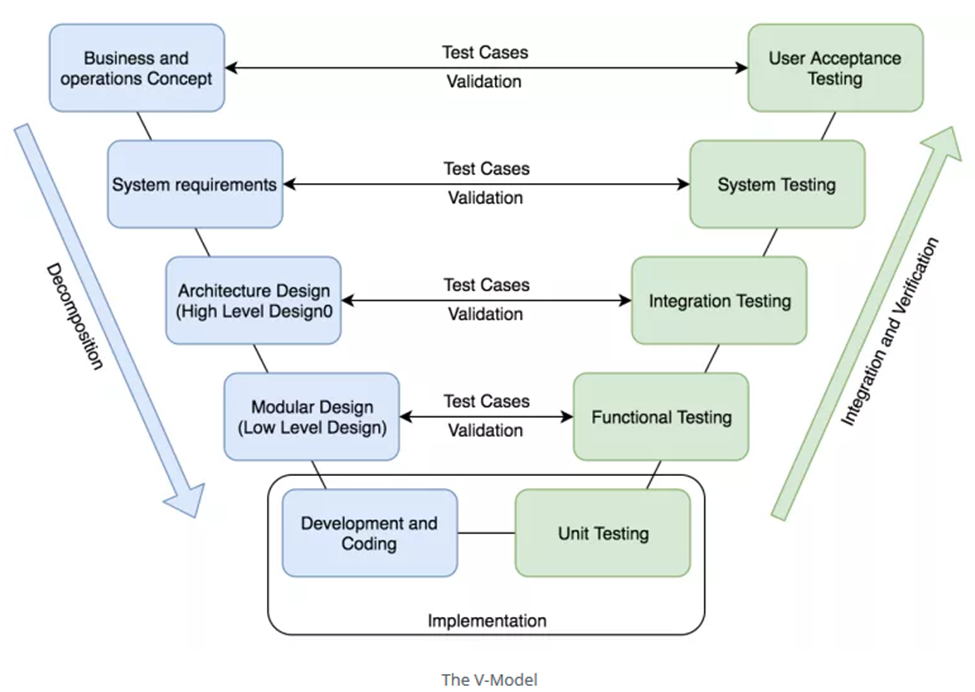 |
|||
| 305 | ||||
| 306 | Model is mostly known as the validation and verification software development. Although it is considered as an improvement to the waterfall model and it has some similarities as the process also based on sequential steps moving down in a linear way, it differs from the waterfall model as the steps move upwards after the coding phase to form the typical V shape. This V shape demonstrates the relationships between each phase of the development life cycle and its associated phase of testing. |
|||
| 307 | ||||
| 308 | This means that any phase in the development process begins only if the previous phase is complete and has a corresponding related testing phase, which is performed against this phase's completion. Similar to the Waterfall model, the V-Model does not define the process to go back to the previous phase to handle changes in requirements. |
|||
| 309 | The technical aspect of the project cycle is considered as a V shape starting with the business needs on the upper left and ending with the user acceptance testing on the upper right. |
|||
| 310 | ||||
| 311 | **V-Model Model Phases** |
|||
| 312 | ||||
| 313 | The V-Model contains the main phases similar to other process models. You can read this article for more information about SDLC phases definitions. |
|||
| 314 | Moreover, it breaks down the testing phase into detailed steps to ensure the validation and verification process. So, it contains the following testing phases: |
|||
| 315 | ||||
| 316 | **Unit Testing** Unit testing is the testing at the code level and helps eliminate issues at an early stage, mainly the developer is responsible to perform the unit test for his code while not all the defects cannot be discovered at the unit testing. |
|||
| 317 | ||||
| 318 | **Functional Testing** Functional testing is associated with the low-level design phase which ensures that collections of codes and units are working together probably to execute new function or service. |
|||
| 319 | ||||
| 320 | **Integration Testing** Integration testing is associated with the high-level design phase. Integration testing ensures the integration between all system modules after adding any new functions or updates. |
|||
| 321 | ||||
| 322 | **System Testing** System testing is associated with the system requirements and design phase. It combines the software, hardware, and the integration of this system with the other external systems. |
|||
| 323 | ||||
| 324 | **User Acceptance Testing** User Acceptance testing is associated with the business and operations analysis phase. The customer users are the main performers of this testing based on test cases and scenarios that cover the business requirements to ensure that they have delivered the right software as per the specifications. |
|||
| 325 | ||||
| 326 | **When to use the V-Model Model?** |
|||
| 327 | ||||
| 328 | Due to the nature of the V-Model, it is hard to go back to the previous phase once completed. Although, this is can be very rigid in some software projects which need some flexibility, while, this model can be essential or the most suitable model to other software projects’ contexts and which focus on quality as an important aspect of the delivery. |
|||
| 329 | ||||
| 330 | The usage of V-Model can fall under the projects which did not focus on changing the requirements, for example: |
|||
| 331 | 1. Projects initiated from a request for proposals (RFPs), the customer has a very clear documented requirements |
|||
| 332 | 2. Military projects |
|||
| 333 | 3. Mission Critical projects, for example, in a Space shuttle |
|||
| 334 | 4. Embedded systems. |
|||
| 335 | 5. Projects with defined and clear requirements |
|||
| 336 | ||||
| 337 | ### **13. Measurements** |
|||
| 338 | ||||
| 339 | Measurements standards is used to determine an accuracy as well as to see chain or graph of the process. In measurement of a set, accuracy refers to the closeness of the measurements to a specific value. In the PLAN process area below measurement will be counted, |
|||
| 340 | ||||
| 341 | 1) Deliverables/Release Plans |
|||
| 342 | * Note down deliverables/Releases plan are delivered on planned date or not |
|||
| 343 | ||||
| 344 | ### **14. Skills Required** |
|||
| 345 | ||||
| 346 | ### **15. Verification and Validation** |
|||
| 347 | - Periodic reviews of the process and work will be done by BA and Manager. |
|||
| 348 | - All managerial tasks and required information will be maintained in jira. |
|||
| 349 | - This provides awareness of and insight into software process activities at an appropriate level of abstraction and in a timely manner. The time between the reviews should meet the needs of the organization. |
|||
| 350 | ||||
| 351 | ### **16.Entry and Exit Criteria** |
|||
| 352 | ||||
| 353 | **Entry Criteria** |
|||
| 354 | - Assigned Stakeholders |
|||
| 355 | ||||
| 356 | **Exit Criteria** |
|||
| 357 | ||||
| 358 | ### **17. Acronyms and Abbreviation** |
|||
| 359 | ||||
| 360 | | Acronym/Term | Description/ Definition | |
|||
| 361 | | ------------ | --------------------------------- | |
|||
| 362 | | RTM | Requirement Traceability Matrix | |
|||
| 363 | | PM | Project Manager | |
|||
| 364 | | PL | Project Leader | |
|||
| 365 | | PC | Project Coordinator | |
|||
| 366 | | BA | Business analyst | |
|||
| 367 | | CM | Configuration Management | |
|||
| 368 | | HRM | Human Resource Management | |
|||
| 369 | | TC | Test Cases | |
|||
| 370 | | RSH | Related Stakeholders | |
|||
| 371 | | SPO |