# LLD ## 1. Project Layout The project follows a **modular and layered architecture** designed for scalability, maintainability, and separation of concerns. The **backend** is implemented using **FastAPI**, with distinct folders for models, schemas, services, routes, utilities, and background workers. Each layer has a clear responsibility: - **Models Layer:** Contains ORM classes mapping database tables. - **Schemas Layer:** Defines Pydantic models for request validation and API responses. - **Service Layer:** Implements business logic (NLP, chat assistant). - **Routes Layer:** Defines API endpoints exposed via FastAPI. - **Utility Layer:** Includes reusable components like embedding generation, configuration, logging, and security helpers. - **Worker Layer:** Handles background jobs such as scheduled chat message fetching and NLP processing. This modular layout ensures that each component can evolve independently — for example, NLP services or integrations can scale separately from the main API. The **frontend** is built using **React** and consumes REST APIs exposed by the FastAPI backend. It serves as the user interface for screens, chatbot interactions, and employee views. ### Repository Structure ```bash /repo ├─ /api # FastAPI app │ ├─ main.py │ ├─ routers/ │ │ ├─ auth.py │ │ ├─ chat.py │ │ ├─ employees.py │ ├─ models/ # ORM classes │ └─ services/ # Business logic (NLP invocations, DB helpers) ├─ /workers │ ├─ telegram_worker.py │ ├─ googlechat_worker.py │ ├─ scheduler.py │ └─ nlp_worker.py ├─ /nlp │ └─ embeddings.py ├─ /ragsvc │ └─ rag.py # Retrieval + prompt assembly + LLM call ├─ /frontend # React app │ ├── src/ │ │ ├── components/ # Reusable UI components (cards, modals, charts) │ │ ├── pages/ # Dashboard and chatbot screens │ │ ├── services/ # API service calls │ │ ├── hooks/ # Custom React hooks │ │ ├── contexts/ # Auth and user management │ │ ├── assets/ # Icons, images, and theme files │ │ └── utils/ # Helper functions │ ├── public/ # Static assets │ ├── package.json │ ├── vite.config.js or next.config.js │ └── README.md ├─ /db │ └─ migrations.sql ├─ docker-compose.yml ├─ Dockerfile.api └─ README.md ``` ## 2. Database Schema — SQL DDL The database schema defines all core entities and their relationships for the MVP. It is implemented in **PostgreSQL** and **pgvector** for storing text embeddings used in semantic search. The schema captures four main domains: ### **Employee Domain** - **Tables:** `employees`, `employee_tag` - Manages employee profiles, departmental details, and tag associations. - Defines users of the system (employees and admins) and establishes relationships between employees and tags for access control and contextual filtering. ### **Message Domain** - **Tables:** `messages` - Stores sanitized chat messages fetched from configured data sources. - Each message is tied to an employee (sender) and a data source (Telegram or Google Chat), and includes an embedding vector for semantic search. ### **Tag Domain** - **Tables:** `tags` - Defines organizational tags or categories such as projects, teams, or topics. - Tags serve as contextual identifiers used to categorize employees, data sources, and messages. ### **Data Source Domain** - **Tables:** `data_sources` - Represents external chat integrations (Google Chat or Telegram groups). - Each data source is linked to a specific tag and acts as an entry point for message ingestion. - Foreign key relationships use `ON DELETE CASCADE` for integrity. > Example: Deleting a project automatically removes related skills or employees linked via `projects_employee`. --- ### **employees** ```sql CREATE TABLE employees ( id SERIAL PRIMARY KEY, external_id JSONB, name VARCHAR(150) NOT NULL, role VARCHAR(50) NOT NULL, -- e.g., 'Java Developer' dept VARCHAR(100), tenure VARCHAR(50), is_active BOOLEAN DEFAULT TRUE, is_admin BOOLEAN DEFAULT FALSE ); ``` **Notes:** - `is_admin` defines access privileges (Employee/Admin). - `is_active` allows temporary deactivation without deletion. --- ### messages ```sql CREATE EXTENSION IF NOT EXISTS vector; CREATE TABLE messages ( id SERIAL PRIMARY KEY, employee_id INT REFERENCES employees(id) ON DELETE SET NULL, data_source_id INT REFERENCES data_sources(id) ON DELETE CASCADE, text TEXT NOT NULL, embedding VECTOR(768), -- semantic vector for AI search created_at TIMESTAMP DEFAULT CURRENT_TIMESTAMP ); ``` **Notes:** - `embedding` uses the **pgvector** extension for similarity-based AI search. - `employee_id` may be nullable if sender info is anonymized or unavailable. --- ### tags ```sql CREATE TABLE tags ( id SERIAL PRIMARY KEY, tag_name VARCHAR(100) UNIQUE NOT NULL, is_active BOOLEAN DEFAULT TRUE ); ``` **Notes:** - Tags are assigned to employees and data sources to define context (e.g., “Project Alpha”). - Uniqueness ensures no duplicate project or topic names. --- ### employee–tag Relationship ```sql CREATE TABLE employee_tag ( id SERIAL PRIMARY KEY, employee_id INT REFERENCES employees(id) ON DELETE CASCADE, tag_id INT REFERENCES tags(id) ON DELETE CASCADE, is_active BOOLEAN DEFAULT TRUE ); ``` **Notes:** - Defines a many-to-many relationship between employees and tags. - `is_active` allows toggling tag assignment without deleting the record. --- ### Data Sources ```sql CREATE TABLE data_sources ( id SERIAL PRIMARY KEY, platform VARCHAR(50) NOT NULL, -- e.g., 'telegram', 'google_chat' external_id VARCHAR(200) NOT NULL, -- ID from external platform name VARCHAR(150) NOT NULL, tag_id INT REFERENCES tags(id) ON DELETE SET NULL, description TEXT, is_active BOOLEAN DEFAULT TRUE ); ``` **Notes:** - Links chat groups/spaces to organizational tags. - When a tag is deleted, `tag_id` becomes `NULL` but the data source remains for reference. 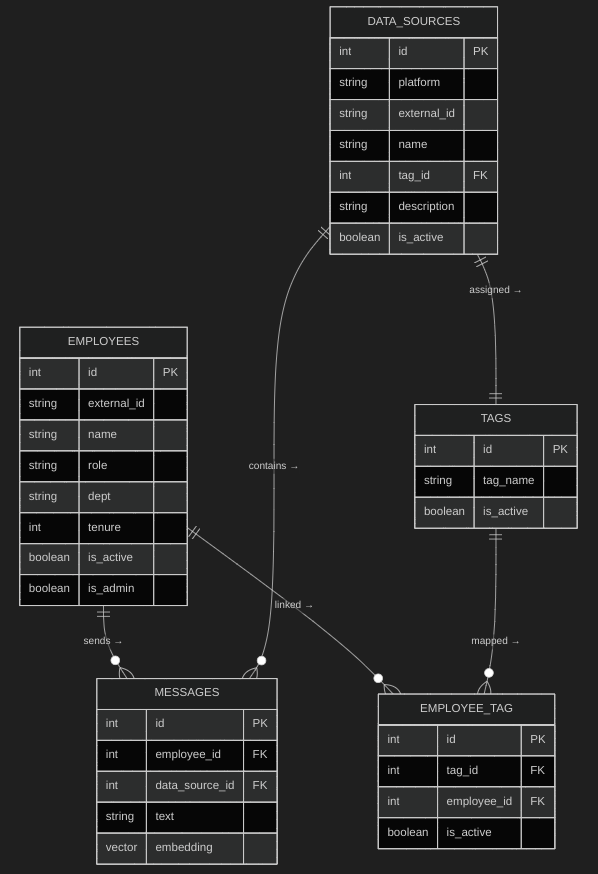 --- ## API Contracts ### 1 GET /employee/{id} **Purpose:** Retrieve a specific employee’s profile (for dashboard view). **Request Path Parameter:** - `id` (integer) — Employee ID. **Response (200 OK):** ```json { "id": 12, "external_id": { "telegram": "tg_987654321", "google_chat": "gc_234567890" }, "name": "Prashant Kumar", "role": "Java Developer", "dept": "Engineering", "tenure": "2 years", "is_active": true, "tags": [ { "id": 3, "tag_name": "Project Alpha" }, { "id": 5, "tag_name": "DevOps" } ] } ``` ### Errors - `404 Not Found` — Employee ID not found. - `400 Bad Request` — Invalid message structure. --- ### 2 GET /employee **Purpose:** List all employees (Admin only). **Query Parameters:** - `is_active` (boolean, optional) - `dept` (string, optional) **Response (200 OK):** ```json [ { "id": 12, "name": "Prashant Kumar", "dept": "Engineering", "role": "Backend Developer", "is_active": true }, { "id": 13, "name": "Ritu Sharma", "dept": "Engineering", "role": "Full Stack Developer", "is_active": false } ] ``` ### 3 POST /message/bulk_ingest **Purpose:** Store messages fetched from integrations (used by ingestion worker). **Request Body:** ```json { "data_source_id": 2, "messages": [ { "employee_id": 12, "text": "Deployment completed for Project Alpha.", "embedding": [0.123, -0.421, 0.567] }, { "employee_id": 14, "text": "We need to update the CI pipeline.", "embedding": [0.998, -0.201, 0.322] } ] } ``` **Response (201 Created):** ```json { "message": "Messages successfully ingested", "count": 2 } ``` **Errors:** - `400 Bad Request` — Invalid message structure. ### 4 POST /tag **Purpose:** Create or update a tag (Admin only). **Request Body:** ```json { "id": 3, "tag_name": "Project Alpha", "is_active": true } ``` **Response (200 OK):** ```json { "message": "Tag upserted successfully", "tag": { "id": 3, "tag_name": "Project Alpha", "is_active": true } } ``` ### 5 GET /tag **Purpose:** Retrieve all active tags. **Response (200 OK):** ```json [ { "id": 3, "tag_name": "Project Alpha" }, { "id": 5, "tag_name": "Knowledge Transfer" } ] ``` ### 6 GET /tag/{id} **Purpose:** Get tag details with linked employees and data sources. **Response (200 OK):** ```json { "id": 3, "tag_name": "Project Alpha", "employees": [ { "id": 12, "name": "Prashant Kumar", "dept": "Engineering" } ], "data_sources": [ { "id": 5, "name": "Alpha Telegram Group", "platform": "telegram" } ] } ``` ### 7 POST /employee_tag **Purpose:** Assign or unassign a tag to an employee (Admin only). **Request Body:** ```json { "employee_id": 12, "tag_id": 3, "is_active": true } ``` **Response (200 OK):** ```json { "message": "Tag assignment updated successfully" } ``` ### 8 GET /employee_tag/{employee_id} **Purpose:** Fetch all tags assigned to a specific employee. **Response (200 OK):** ```json { "employee_id": 12, "tags": [ { "id": 3, "tag_name": "Project Alpha" }, { "id": 5, "tag_name": "DevOps" } ] } ``` ### 9 POST /data_source **Purpose:** Add or update a chat data source. **Request Body:** ```json { "id": 5, "platform": "telegram", "external_id": "tg_123456", "name": "Alpha Project Chat", "tag_id": 3, "description": "Telegram group for Project Alpha", "is_active": true } ``` **Response (200 OK):** ```json { "message": "Data source upserted successfully", "data_source": { "id": 5, "platform": "telegram", "name": "Alpha Project Chat", "tag_id": 3, "is_active": true } } ``` ### 10 GET /data_source **Purpose:** List all configured data sources with their associated tags. **Response (200 OK):** ```json [ { "id": 5, "platform": "telegram", "name": "Alpha Project Chat", "tag": { "id": 3, "tag_name": "Project Alpha" }, "is_active": true }, { "id": 7, "platform": "google_chat", "name": "DevOps Discussion", "tag": { "id": 4, "tag_name": "DevOps" }, "is_active": true } ] ``` ### 11 GET /data_source/{id} **Purpose:** Get details of a specific data source. **Response (200 OK):** ```json { "id": 5, "platform": "telegram", "external_id": "tg_123456", "name": "Alpha Project Chat", "tag": { "id": 3, "tag_name": "Project Alpha" }, "description": "Telegram group for Project Alpha", "is_active": true } ``` ### 12 POST /chatbot/query **Purpose:** Submit a natural language query to the AI assistant. **Request Body:** ```json { "query": "What are the latest updates on Project Alpha?", "employee_id": 12 } ``` **Response (200 OK):** ```json { "answer": "Recent messages mention deployment completion and testing for Project Alpha.", "related_messages": [ { "id": 234, "text": "Deployment completed for Project Alpha.", "employee": "Prashant Kumar", "timestamp": "2025-10-08T09:32:15Z" } ] } ``` ### 13 GET /admin/overview **Purpose:** Retrieve system overview for Admin dashboard. **Response (200 OK):** ```json { "active_employees": 25, "active_tags": 8, "data_sources": [ { "tag_name": "Project Alpha", "sources": 2 }, { "tag_name": "DevOps", "sources": 1 } ], "message_count_per_tag": [ { "tag_name": "Project Alpha", "count": 120 }, { "tag_name": "DevOps", "count": 85 } ] } ``` # 4. Core Class Layers Overview 1. **Models Layer** → ORM classes (DB mapping) 2. **Schemas Layer** → Pydantic models for request/response validation 3. **Service Layer** → Business logic (NLP, Chatbot, Handover) 4. **Routes Layer** → FastAPI endpoints 5. **Utility Layer** → Common helpers (security, embeddings, config) 6. **Scheduler Layer** → Cron jobs --- ## 1 Models Layer (ORM – Database Mapping) Defines ORM entities using SQLAlchemy, each mapped to a database table. ### Employee - **Purpose:** Represents system users and their platform identifiers. - **Key Fields:** `id`, `external_ids` (JSONB), `name`, `role`, `dept`, `tenure`, `is_admin`, `is_active`. ### Message - **Purpose:** Stores cleaned messages fetched from data sources. - **Key Fields:** `id`, `employee_id`, `data_source_id`, `text`, `embedding`, `created_at`. ### Tag - **Purpose:** Defines project or topic categories (e.g., “Project Alpha”). - **Key Fields:** `id`, `tag_name`, `is_active`. ### EmployeeTag - **Purpose:** Junction table linking Employee and Tag. - **Key Fields:** `id`, `employee_id`, `tag_id`, `is_active`. ### DataSource - **Purpose:** Represents chat integrations like Telegram or Google Chat. - **Key Fields:** `id`, `platform`, `external_id`, `name`, `tag_id`, `description`, `is_active`. --- ## 2 Schemas Layer (Pydantic Models) Defines data validation and serialization classes for API input/output. - **EmployeeBase / EmployeeResponse** Purpose: Serialize employee info for API responses. Fields: `id`, `name`, `role`, `dept`, `tenure`, `is_admin`, `is_active`, `external_ids`, `tags`. - **MessageIngestRequest** Purpose: Request body for bulk message ingestion. Fields: `data_source_id`, `messages` (list of `{employee_id, text, embedding}`). - **TagCreate / TagResponse** Purpose: Used for tag creation and retrieval. Fields: `id`, `tag_name`, `is_active`. - **EmployeeTagRequest** Purpose: Assign or unassign tag to employee. Fields: `employee_id`, `tag_id`, `is_active`. - **DataSourceRequest / DataSourceResponse** Purpose: Manage chat data sources. Fields: `id`, `platform`, `external_id`, `name`, `tag_id`, `description`, `is_active`. - **ChatbotQueryRequest / ChatbotResponse** Purpose: Handles chatbot input/output payloads. Fields (Request): `query`, `employee_id` Fields (Response): `answer`, `related_messages` --- ## 3 Service Layer (Business Logic) Implements all application logic — CRUD operations, AI processing, and integrations. ### EmployeeService - **Purpose:** Manage employee CRUD and tag relationships. - **Key Methods:** - `get_employee(id)` – Fetch employee with tags. - `list_employees(is_active)` – List all employees. - `create_or_update(data)` – Upsert employee. ### TagService - **Purpose:** Handle tag creation, lookup, and linking to employees or sources. - **Key Methods:** - `create_or_update(tag_data)` - `get_tag(id)` - `get_all_tags()` ### EmployeeTagService - **Purpose:** Manage mappings between employees and tags. - **Key Methods:** - `assign_tag(employee_id, tag_id)` - `get_tags_for_employee(employee_id)` ### MessageService - **Purpose:** Ingest, store, and fetch messages. - **Key Methods:** - `bulk_ingest(messages)` – Save messages after processing. - `get_by_tag(tag_id)` – Retrieve all messages under a tag. ### DataSourceService - **Purpose:** Manage chat integration sources. - **Key Methods:** - `create_or_update(source_data)` - `get_active_sources()` - `get_source_details(id)` ### ChatbotService - **Purpose:** Provide AI-based Q&A by semantic search. - **Key Methods:** - `query(text, employee_id)` – Generate embeddings, find similar messages. --- ## 4 Routes Layer (FastAPI Endpoints) Defines REST API endpoints; connects incoming requests to service methods. - **EmployeeRouter** - `GET /employee/{id}` – Fetch employee details - `GET /employee` – List employees - **MessageRouter** - `POST /message/bulk_ingest` – Store processed chat messages - **TagRouter** - `POST /tag` – Create or update a tag - `GET /tag` – Retrieve all tags - `GET /tag/{id}` – Tag details with employees and data sources - **EmployeeTagRouter** - `POST /employee_tag` – Assign/unassign tag to employee - `GET /employee_tag/{employee_id}` – Get employee’s tags - **DataSourceRouter** - `POST /data_source` – Add or update chat source - `GET /data_source` – List all data sources - `GET /data_source/{id}` – Fetch specific data source - **ChatbotRouter** - `POST /chatbot/query` – Handle AI question-answer queries - **AdminRouter** - `GET /admin/overview` – Returns admin dashboard summary --- ## 5 Utility Layer (Helper Modules) Provides shared functionality for embeddings, sanitization, security, and configuration. ### EmbeddingService - **Purpose:** Convert text to embeddings using SentenceTransformer - **Key Methods:** `generate(text)` – Returns 768-dim vector embedding ### SanitizationUtils - **Purpose:** Clean raw chat messages - **Key Methods:** `sanitize(text)` – Remove PII, URLs, emojis, and normalize case ### AuthUtils - **Purpose:** Handle authentication and access control - **Key Methods:** - `validate_token(token)` - `is_admin(user)` ### Config - **Purpose:** Centralized configuration management - **Sources:** `.env file`, environment variables ### Logger - **Purpose:** Unified logging across services - **Key Methods:** `info()`, `error()`, `debug()` --- ## 6 Scheduler Layer (Cron & Background Jobs) Handles periodic and background operations such as message ingestion and cleanup. ### ChatIngestionJob - **Purpose:** Periodically fetch new messages from Telegram/Google Chat sources - **Key Methods:** `run()` – Fetch active data sources and ingest new messages ### EmbeddingRefreshJob (Enhancement) - **Purpose:** Recompute embeddings for all stored messages (if model changes) - **Key Methods:** `run()` – Iterate through messages, regenerate embeddings ### CleanupJob (Enhancement) - **Purpose:** Archive or delete inactive data sources and outdated messages - **Key Methods:** `run()` – Perform cleanup based on retention policies # 5. Sequence Diagrams ## Ingestion → NLP → Store 1. **Scheduler (ChatIngestionJob)** runs periodically. 2. **DataSourceService** fetches all active sources from the `data_sources` table. 3. For each source: - The system fetches messages using **Telegram/Google Chat APIs**. - **SanitizationUtils** cleans the text. - **EmbeddingService** converts it into a semantic vector. - **MessageService** stores the text + embedding in the `messages` table. 4. The job logs completion status. 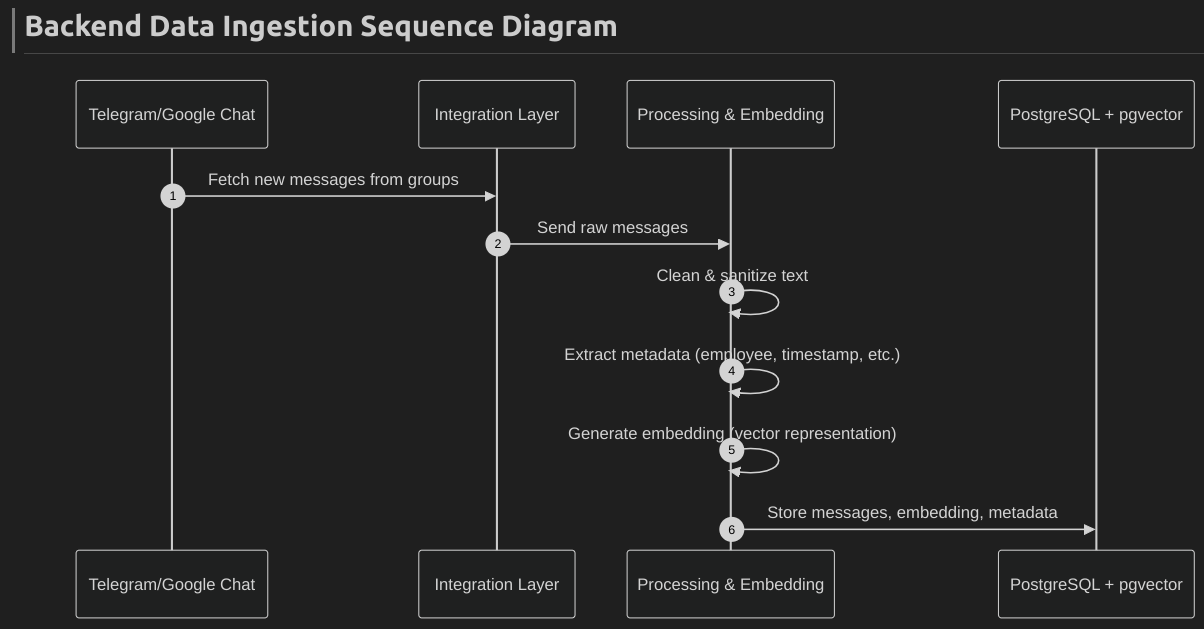 --- ## User query → RAG 1. The **Frontend Chat UI** sends the query to `/chatbot/query` along with `employee_id`. 2. **ChatbotService** generates a vector embedding for the query. 3. **EmployeeTagService** fetches which tags this employee has access to. 4. **MessageService** performs a vector similarity search within messages linked to those tags. 5. The **LLM** (e.g., OpenAI GPT / local model) generates a summarized, context-aware response. 6. The system returns both: - `answer` → generated explanation or summary. - `related_messages` → list of original message snippets. 7. The Frontend displays both to the user. 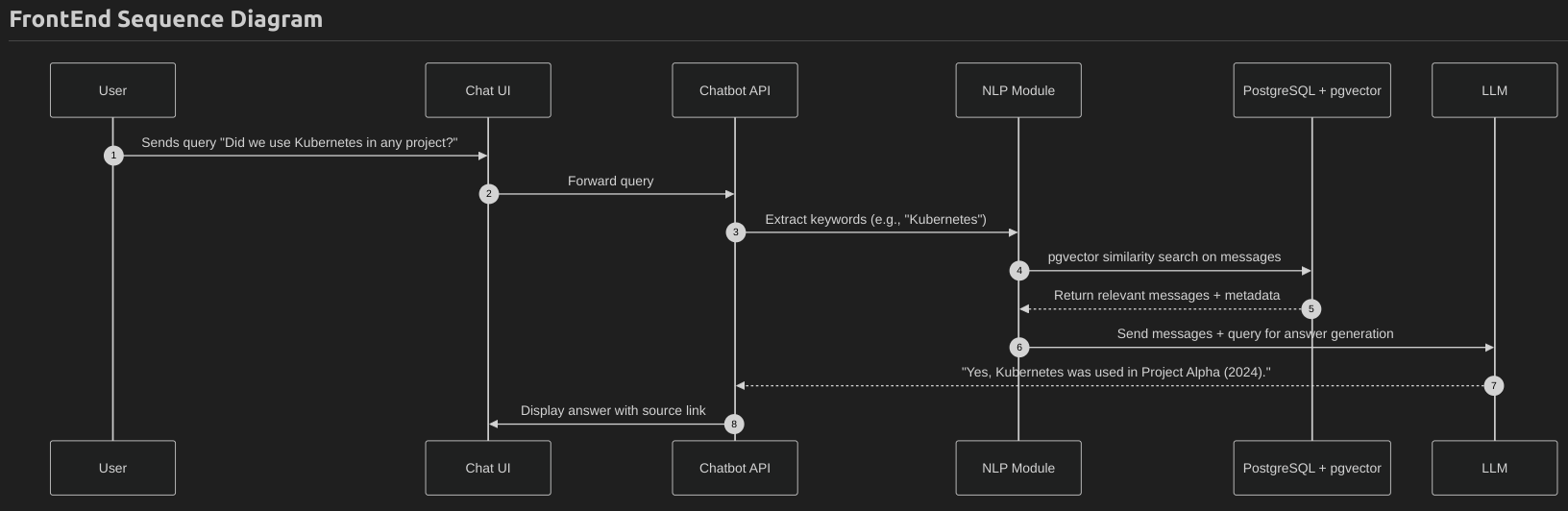 --- # 6. Docker Compose (MVP) **docker-compose.yml (trimmed)** ```yaml version: "3.9" services: # ------------------------------- # PostgreSQL Database # ------------------------------- db: image: postgres:15 container_name: knowledge_db restart: always environment: POSTGRES_USER: postgres POSTGRES_PASSWORD: postgres POSTGRES_DB: knowledge_assistant ports: - "5432:5432" volumes: - db_data:/var/lib/postgresql/data - ./db/init.sql:/docker-entrypoint-initdb.d/init.sql healthcheck: test: ["CMD-SHELL", "pg_isready -U postgres"] interval: 10s timeout: 5s retries: 5 # ------------------------------- # FastAPI Backend (Main API) # ------------------------------- api: build: ./backend container_name: knowledge_api restart: always depends_on: db: condition: service_healthy environment: DATABASE_URL: postgresql+psycopg2://postgres:postgres@db:5432/knowledge_assistant APP_ENV: dev EMBEDDING_MODEL: all-MiniLM-L6-v2 ports: - "8000:8000" volumes: - ./backend:/app command: uvicorn main:app --host 0.0.0.0 --port 8000 --reload # ------------------------------- # NLP Worker (Embedding + Sanitization) # ------------------------------- nlp_worker: build: ./workers container_name: knowledge_nlp_worker restart: always depends_on: db: condition: service_healthy environment: DATABASE_URL: postgresql+psycopg2://postgres:postgres@db:5432/knowledge_assistant EMBEDDING_MODEL: all-MiniLM-L6-v2 command: python nlp_worker.py volumes: - ./workers:/app # ------------------------------- # Frontend (React / Next.js) # ------------------------------- frontend: build: ./frontend container_name: knowledge_frontend restart: always depends_on: - api ports: - "3000:3000" environment: NEXT_PUBLIC_API_URL: http://localhost:8000 volumes: - ./frontend:/app command: npm run dev volumes: db_data: ``` **Environment Variables (.env)** Store secrets in a `.env` file: ```env OPENAI_API_KEY=your_openai_api_key DB_URL=postgresql+psycopg2://postgres:postgres@db:5432/knowledge_assistant TELEGRAM_TOKEN=your_telegram_token GOOGLE_CHAT_CRED=path_to_google_chat_credentials ``` # 7. Security, Privacy & RBAC ## Authentication - Uses JWT-based authentication with token expiry (1 hour). - Each request validated via `Authorization: Bearer <token>`. - Secure credentials managed via environment variables (`.env`). ## Role-Based Access Control (RBAC) | Role | Access | |------------|--------| | Admin (`is_admin=true`) | Full control — manage employees, tags, data sources, and view all data. | | Employee (`is_admin=false`) | Limited access — can view only their profile, assigned tags, and chatbot results. | ### Data Security - HTTPS for all communication. - Database encryption at rest. - Sanitization removes PII, links, and emojis before storing messages. - Minimal data stored — only required employee metadata. ### Privacy & Logging - Employees can only access data within their assigned tags. - Admin actions (tag assignments, data source edits) are logged. - No raw chat data exposed to unauthorized users. ### Testing & Compliance - JWT expiry and access control verified via Pytest. - Sanitization tested for PII removal. - Follows privacy-by-design and principle of least privilege. --- # 8. Testing Plan | Type | Purpose | Tools | |-------------------|--------------------------------------------------|-------------------| | Unit Tests | Validate individual functions and classes (services, utils) | pytest | | Integration Tests | Ensure API ↔ DB ↔ service flow works end-to-end | pytest, Docker | | API Tests | Validate REST endpoints, inputs, and responses | Postman | | Functional Tests | Simulate user actions (profile, tag, chatbot) | Cypress | | Performance Tests | Measure API latency & embedding search speed | Locust / k6 | | Security Tests | Check authentication, authorization, and data access | OWASP ZAP | --- # 9. Monitoring - **Application Logs:** Centralized logging using Python’s logging module for API requests, background jobs, and errors. - **Health Checks:** `/health` endpoint to monitor API and DB connectivity. - **Container Monitoring:** Docker health checks for `api`, `db`, and `nlp_worker` services. - **Metrics (Future):** Integration with Prometheus + Grafana for API latency, ingestion rate, and message count tracking. - **Alerts:** Basic email or Slack alerts for service failures or ingestion errors. --- # 10. Implementation Priorities (1-month) ### Week 1 — Core Backend Setup **Objectives:** - Define and create DB schema: `employees`, `messages`, `tags`, `employee_tag`, `data_sources`. - Set up FastAPI project structure (models, schemas, routes, services). - Implement JWT authentication and role-based access (`is_admin`). - Build core CRUD APIs: `/employee`, `/tag`, `/employee_tag`, `/data_source`. - Setup PostgreSQL + pgvector in Docker Compose. - Test all endpoints via Postman. ### Week 2 — Ingestion & AI Layer **Objectives:** Implement message ingestion pipeline: - `/message/bulk_ingest` endpoint - `nlp_worker` for sanitization (remove PII, links, emojis) - Generate embeddings (SentenceTransformer) Store cleaned messages and embeddings in DB. Build ChatbotService: - Vector search for similar messages - Summarize top matches (basic LLM/OpenAI API) Unit tests for message ingestion and chatbot logic ### Week 3 — Frontend & Integration **Objectives:** Create minimal React/Next.js frontend: - Employee Dashboard: Profile + AI Chatbot - Admin Dashboard: Manage Employees, Tags, Data Sources - Integrate frontend with backend APIs. - Implement `/chatbot/query` UI → Backend connection. - Add health checks, structured logging, and final testing. - Prepare MVP demo. ### Week 4 — Testing, Fixes & Demo **Objectives:** - Conduct end-to-end system testing (API + UI + AI flow). - Fix API bugs, UI alignment, and edge cases. - Add basic logging, health checks, and monitoring scripts. - Conduct user acceptance testing (UAT) internally. - Prepare final demo build via Docker Compose. - MVP presentation and walkthrough.