LLD
1. Project Layout
The project follows a modular and layered architecture designed for scalability, maintainability, and separation of concerns. The backend is implemented using FastAPI, with distinct folders for models, schemas, services, routes, utilities, and background workers.
Each layer has a clear responsibility:
- Models Layer: Contains ORM classes mapping database tables.
- Schemas Layer: Defines Pydantic models for request validation and API responses.
- Service Layer: Implements business logic (NLP, chat assistant).
- Routes Layer: Defines API endpoints exposed via FastAPI.
- Utility Layer: Includes reusable components like embedding generation, configuration, logging, and security helpers.
- Worker Layer: Handles background jobs such as scheduled chat message fetching and NLP processing.
This modular layout ensures that each component can evolve independently — for example, NLP services or integrations can scale separately from the main API.
The frontend is built using React and consumes REST APIs exposed by the FastAPI backend. It serves as the user interface for screens, chatbot interactions, and employee views.
Repository Structure
/repo
├─ /api                     # FastAPI app
│  ├─ main.py
│  ├─ routers/
│  │   ├─ auth.py
│  │   ├─ chat.py
│  │   ├─ employees.py
│  ├─ models/                # ORM classes
│  └─ services/              # Business logic (NLP invocations, DB helpers)
├─ /workers
│  ├─ telegram_worker.py
│  ├─ googlechat_worker.py
│  ├─ scheduler.py
│  └─ nlp_worker.py
├─ /nlp
│  └─ embeddings.py
├─ /ragsvc
│  └─ rag.py                 # Retrieval + prompt assembly + LLM call
├─ /frontend                 # React app
│  ├── src/
│  │   ├── components/       # Reusable UI components (cards, modals, charts)
│  │   ├── pages/            # Dashboard and chatbot screens
│  │   ├── services/         # API service calls
│  │   ├── hooks/            # Custom React hooks
│  │   ├── contexts/         # Auth and user management
│  │   ├── assets/           # Icons, images, and theme files
│  │   └── utils/            # Helper functions
│  ├── public/               # Static assets
│  ├── package.json
│  ├── vite.config.js or next.config.js
│  └── README.md
├─ /db
│  └─ migrations.sql
├─ docker-compose.yml
├─ Dockerfile.api
└─ README.md
2. Database Schema — SQL DDL
The database schema defines all core entities and their relationships for the MVP.
It is implemented in PostgreSQL and pgvector for storing text embeddings used in semantic search.
The schema captures four main domains:
Employee Domain
- Tables:
employees,employee_tag - Manages employee profiles, departmental details, and tag associations.
- Defines users of the system (employees and admins) and establishes relationships between employees and tags for access control and contextual filtering.
Message Domain
- Tables:
messages - Stores sanitized chat messages fetched from configured data sources.
- Each message is tied to an employee (sender) and a data source (Telegram or Google Chat), and includes an embedding vector for semantic search.
Tag Domain
- Tables:
tags - Defines organizational tags or categories such as projects, teams, or topics.
- Tags serve as contextual identifiers used to categorize employees, data sources, and messages.
Data Source Domain
- Tables:
data_sources - Represents external chat integrations (Google Chat or Telegram groups).
- Each data source is linked to a specific tag and acts as an entry point for message ingestion.
- Foreign key relationships use
ON DELETE CASCADEfor integrity.
Example: Deleting a project automatically removes related skills or employees linked via
projects_employee.
employees
CREATE TABLE employees (
    id SERIAL PRIMARY KEY,
    external_id JSONB,
    name VARCHAR(150) NOT NULL,
    role VARCHAR(50) NOT NULL,          -- e.g., 'Java Developer'
    dept VARCHAR(100),
    tenure VARCHAR(50),
    is_active BOOLEAN DEFAULT TRUE,
    is_admin BOOLEAN DEFAULT FALSE
);
Notes:
is_admindefines access privileges (Employee/Admin).is_activeallows temporary deactivation without deletion.
messages
CREATE EXTENSION IF NOT EXISTS vector;

CREATE TABLE messages (
    id SERIAL PRIMARY KEY,
    employee_id INT REFERENCES employees(id) ON DELETE SET NULL,
    data_source_id INT REFERENCES data_sources(id) ON DELETE CASCADE,
    text TEXT NOT NULL,
    embedding VECTOR(768),              -- semantic vector for AI search
    created_at TIMESTAMP DEFAULT CURRENT_TIMESTAMP
);
Notes:
embeddinguses the pgvector extension for similarity-based AI search.employee_idmay be nullable if sender info is anonymized or unavailable.
tags
CREATE TABLE tags (
    id SERIAL PRIMARY KEY,
    tag_name VARCHAR(100) UNIQUE NOT NULL,
    is_active BOOLEAN DEFAULT TRUE
);
Notes:
- Tags are assigned to employees and data sources to define context (e.g., “Project Alpha”).
- Uniqueness ensures no duplicate project or topic names.
employee–tag Relationship
CREATE TABLE employee_tag (
    id SERIAL PRIMARY KEY,
    employee_id INT REFERENCES employees(id) ON DELETE CASCADE,
    tag_id INT REFERENCES tags(id) ON DELETE CASCADE,
    is_active BOOLEAN DEFAULT TRUE
);
Notes:
- Defines a many-to-many relationship between employees and tags.
is_activeallows toggling tag assignment without deleting the record.
Data Sources
CREATE TABLE data_sources (
    id SERIAL PRIMARY KEY,
    platform VARCHAR(50) NOT NULL,      -- e.g., 'telegram', 'google_chat'
    external_id VARCHAR(200) NOT NULL,  -- ID from external platform
    name VARCHAR(150) NOT NULL,
    tag_id INT REFERENCES tags(id) ON DELETE SET NULL,
    description TEXT,
    is_active BOOLEAN DEFAULT TRUE
);
Notes:
- Links chat groups/spaces to organizational tags.
- When a tag is deleted,
tag_idbecomesNULLbut the data source remains for reference.
API Contracts
1 GET /employee/{id}
Purpose: Retrieve a specific employee’s profile (for dashboard view).
Request Path Parameter:
id(integer) — Employee ID.
Response (200 OK):
{
  "id": 12,
  "external_id": {
    "telegram": "tg_987654321",
    "google_chat": "gc_234567890"
  },
  "name": "Prashant Kumar",
  "role": "Java Developer",
  "dept": "Engineering",
  "tenure": "2 years",
  "is_active": true,
  "tags": [
    { "id": 3, "tag_name": "Project Alpha" },
    { "id": 5, "tag_name": "DevOps" }
  ]
}
Errors
404 Not Found— Employee ID not found.400 Bad Request— Invalid message structure.
2 GET /employee
Purpose: List all employees (Admin only).
Query Parameters:
is_active(boolean, optional)dept(string, optional)
Response (200 OK):
[
  {
    "id": 12,
    "name": "Prashant Kumar",
    "dept": "Engineering",
    "role": "Backend Developer",
    "is_active": true
  },
  {
    "id": 13,
    "name": "Ritu Sharma",
    "dept": "Engineering",
    "role": "Full Stack Developer",
    "is_active": false
  }
]
3 POST /message/bulk_ingest
Purpose: Store messages fetched from integrations (used by ingestion worker).
Request Body:
{
  "data_source_id": 2,
  "messages": [
    {
      "employee_id": 12,
      "text": "Deployment completed for Project Alpha.",
      "embedding": [0.123, -0.421, 0.567]
    },
    {
      "employee_id": 14,
      "text": "We need to update the CI pipeline.",
      "embedding": [0.998, -0.201, 0.322]
    }
  ]
}
Response (201 Created):
{
  "message": "Messages successfully ingested",
  "count": 2
}
Errors:
400 Bad Request— Invalid message structure.
4 POST /tag
Purpose: Create or update a tag (Admin only).
Request Body:
{
  "id": 3,
  "tag_name": "Project Alpha",
  "is_active": true
}
Response (200 OK):
{
  "message": "Tag upserted successfully",
  "tag": { "id": 3, "tag_name": "Project Alpha", "is_active": true }
}
5 GET /tag
Purpose: Retrieve all active tags.
Response (200 OK):
[
  { "id": 3, "tag_name": "Project Alpha" },
  { "id": 5, "tag_name": "Knowledge Transfer" }
]
6 GET /tag/{id}
Purpose: Get tag details with linked employees and data sources.
Response (200 OK):
{
  "id": 3,
  "tag_name": "Project Alpha",
  "employees": [
    { "id": 12, "name": "Prashant Kumar", "dept": "Engineering" }
  ],
  "data_sources": [
    { "id": 5, "name": "Alpha Telegram Group", "platform": "telegram" }
  ]
}
7 POST /employee_tag
Purpose: Assign or unassign a tag to an employee (Admin only).
Request Body:
{
  "employee_id": 12,
  "tag_id": 3,
  "is_active": true
}
Response (200 OK):
{
  "message": "Tag assignment updated successfully"
}
8 GET /employee_tag/{employee_id}
Purpose: Fetch all tags assigned to a specific employee.
Response (200 OK):
{
  "employee_id": 12,
  "tags": [
    { "id": 3, "tag_name": "Project Alpha" },
    { "id": 5, "tag_name": "DevOps" }
  ]
}
9 POST /data_source
Purpose: Add or update a chat data source.
Request Body:
{
  "id": 5,
  "platform": "telegram",
  "external_id": "tg_123456",
  "name": "Alpha Project Chat",
  "tag_id": 3,
  "description": "Telegram group for Project Alpha",
  "is_active": true
}
Response (200 OK):
{
  "message": "Data source upserted successfully",
  "data_source": {
    "id": 5,
    "platform": "telegram",
    "name": "Alpha Project Chat",
    "tag_id": 3,
    "is_active": true
  }
}
10 GET /data_source
Purpose: List all configured data sources with their associated tags.
Response (200 OK):
[
  {
    "id": 5,
    "platform": "telegram",
    "name": "Alpha Project Chat",
    "tag": { "id": 3, "tag_name": "Project Alpha" },
    "is_active": true
  },
  {
    "id": 7,
    "platform": "google_chat",
    "name": "DevOps Discussion",
    "tag": { "id": 4, "tag_name": "DevOps" },
    "is_active": true
  }
]
11 GET /data_source/{id}
Purpose: Get details of a specific data source.
Response (200 OK):
{
  "id": 5,
  "platform": "telegram",
  "external_id": "tg_123456",
  "name": "Alpha Project Chat",
  "tag": { "id": 3, "tag_name": "Project Alpha" },
  "description": "Telegram group for Project Alpha",
  "is_active": true
}
12 POST /chatbot/query
Purpose: Submit a natural language query to the AI assistant.
Request Body:
{
  "query": "What are the latest updates on Project Alpha?",
  "employee_id": 12
}
Response (200 OK):
{
  "answer": "Recent messages mention deployment completion and testing for Project Alpha.",
  "related_messages": [
    {
      "id": 234,
      "text": "Deployment completed for Project Alpha.",
      "employee": "Prashant Kumar",
      "timestamp": "2025-10-08T09:32:15Z"
    }
  ]
}
13 GET /admin/overview
Purpose: Retrieve system overview for Admin dashboard.
Response (200 OK):
{
  "active_employees": 25,
  "active_tags": 8,
  "data_sources": [
    { "tag_name": "Project Alpha", "sources": 2 },
    { "tag_name": "DevOps", "sources": 1 }
  ],
  "message_count_per_tag": [
    { "tag_name": "Project Alpha", "count": 120 },
    { "tag_name": "DevOps", "count": 85 }
  ]
}
4. Core Class Layers Overview
- Models Layer → ORM classes (DB mapping)
- Schemas Layer → Pydantic models for request/response validation
- Service Layer → Business logic (NLP, Chatbot, Handover)
- Routes Layer → FastAPI endpoints
- Utility Layer → Common helpers (security, embeddings, config)
- Scheduler Layer → Cron jobs
1 Models Layer (ORM – Database Mapping)
Defines ORM entities using SQLAlchemy, each mapped to a database table.
Employee
- Purpose: Represents system users and their platform identifiers.
- Key Fields:
id,external_ids(JSONB),name,role,dept,tenure,is_admin,is_active.
Message
- Purpose: Stores cleaned messages fetched from data sources.
- Key Fields:
id,employee_id,data_source_id,text,embedding,created_at.
Tag
- Purpose: Defines project or topic categories (e.g., “Project Alpha”).
- Key Fields:
id,tag_name,is_active.
EmployeeTag
- Purpose: Junction table linking Employee and Tag.
- Key Fields:
id,employee_id,tag_id,is_active.
DataSource
- Purpose: Represents chat integrations like Telegram or Google Chat.
- Key Fields:
id,platform,external_id,name,tag_id,description,is_active.
2 Schemas Layer (Pydantic Models)
Defines data validation and serialization classes for API input/output.
EmployeeBase / EmployeeResponse
Purpose: Serialize employee info for API responses.
Fields:id,name,role,dept,tenure,is_admin,is_active,external_ids,tags.MessageIngestRequest
Purpose: Request body for bulk message ingestion.
Fields:data_source_id,messages(list of{employee_id, text, embedding}).TagCreate / TagResponse
Purpose: Used for tag creation and retrieval.
Fields:id,tag_name,is_active.EmployeeTagRequest
Purpose: Assign or unassign tag to employee.
Fields:employee_id,tag_id,is_active.DataSourceRequest / DataSourceResponse
Purpose: Manage chat data sources.
Fields:id,platform,external_id,name,tag_id,description,is_active.ChatbotQueryRequest / ChatbotResponse
Purpose: Handles chatbot input/output payloads.
Fields (Request):query,employee_id
Fields (Response):answer,related_messages
3 Service Layer (Business Logic)
Implements all application logic — CRUD operations, AI processing, and integrations.
EmployeeService
- Purpose: Manage employee CRUD and tag relationships.
- Key Methods:
get_employee(id)– Fetch employee with tags.list_employees(is_active)– List all employees.create_or_update(data)– Upsert employee.
TagService
- Purpose: Handle tag creation, lookup, and linking to employees or sources.
- Key Methods:
create_or_update(tag_data)get_tag(id)get_all_tags()
EmployeeTagService
- Purpose: Manage mappings between employees and tags.
- Key Methods:
assign_tag(employee_id, tag_id)get_tags_for_employee(employee_id)
MessageService
- Purpose: Ingest, store, and fetch messages.
- Key Methods:
bulk_ingest(messages)– Save messages after processing.get_by_tag(tag_id)– Retrieve all messages under a tag.
DataSourceService
- Purpose: Manage chat integration sources.
- Key Methods:
create_or_update(source_data)get_active_sources()get_source_details(id)
ChatbotService
- Purpose: Provide AI-based Q&A by semantic search.
- Key Methods:
query(text, employee_id)– Generate embeddings, find similar messages.
4 Routes Layer (FastAPI Endpoints)
Defines REST API endpoints; connects incoming requests to service methods.
EmployeeRouter
GET /employee/{id}– Fetch employee detailsGET /employee– List employees
MessageRouter
POST /message/bulk_ingest– Store processed chat messages
TagRouter
POST /tag– Create or update a tagGET /tag– Retrieve all tagsGET /tag/{id}– Tag details with employees and data sources
EmployeeTagRouter
POST /employee_tag– Assign/unassign tag to employeeGET /employee_tag/{employee_id}– Get employee’s tags
DataSourceRouter
POST /data_source– Add or update chat sourceGET /data_source– List all data sourcesGET /data_source/{id}– Fetch specific data source
ChatbotRouter
POST /chatbot/query– Handle AI question-answer queries
AdminRouter
GET /admin/overview– Returns admin dashboard summary
5 Utility Layer (Helper Modules)
Provides shared functionality for embeddings, sanitization, security, and configuration.
EmbeddingService
- Purpose: Convert text to embeddings using SentenceTransformer
- Key Methods:
generate(text)– Returns 768-dim vector embedding
SanitizationUtils
- Purpose: Clean raw chat messages
- Key Methods:
sanitize(text)– Remove PII, URLs, emojis, and normalize case
AuthUtils
- Purpose: Handle authentication and access control
- Key Methods:
validate_token(token)is_admin(user)
Config
- Purpose: Centralized configuration management
- Sources:
.env file, environment variables
Logger
- Purpose: Unified logging across services
- Key Methods:
info(),error(),debug()
6 Scheduler Layer (Cron & Background Jobs)
Handles periodic and background operations such as message ingestion and cleanup.
ChatIngestionJob
- Purpose: Periodically fetch new messages from Telegram/Google Chat sources
- Key Methods:
run()– Fetch active data sources and ingest new messages
EmbeddingRefreshJob (Enhancement)
- Purpose: Recompute embeddings for all stored messages (if model changes)
- Key Methods:
run()– Iterate through messages, regenerate embeddings
CleanupJob (Enhancement)
- Purpose: Archive or delete inactive data sources and outdated messages
- Key Methods:
run()– Perform cleanup based on retention policies
5. Sequence Diagrams
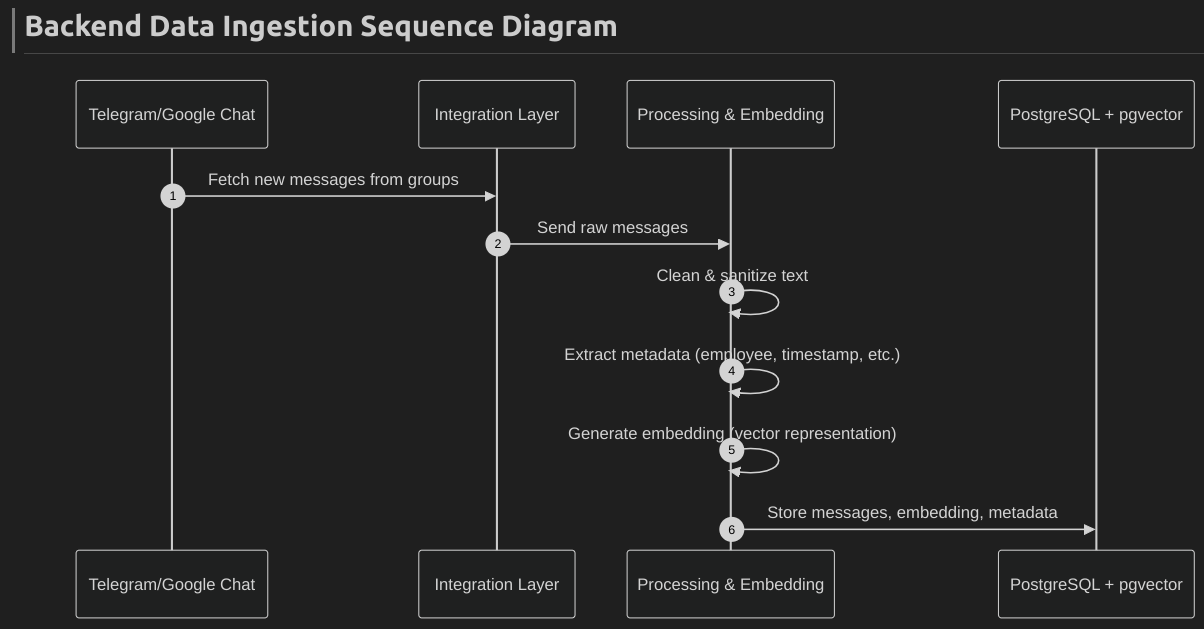
Ingestion → NLP → Store
- Scheduler (ChatIngestionJob) runs periodically.
- DataSourceService fetches all active sources from the
data_sourcestable. - For each source:
- The system fetches messages using Telegram/Google Chat APIs.
- SanitizationUtils cleans the text.
- EmbeddingService converts it into a semantic vector.
- MessageService stores the text + embedding in the
messagestable.
- The job logs completion status.
User query → RAG
- The Frontend Chat UI sends the query to
/chatbot/queryalong withemployee_id. - ChatbotService generates a vector embedding for the query.
- EmployeeTagService fetches which tags this employee has access to.
- MessageService performs a vector similarity search within messages linked to those tags.
- The LLM (e.g., OpenAI GPT / local model) generates a summarized, context-aware response.
- The system returns both:
answer→ generated explanation or summary.related_messages→ list of original message snippets.
- The Frontend displays both to the user.
6. Docker Compose (MVP)
docker-compose.yml (trimmed)
version: "3.9"

services:
  # -------------------------------
  # PostgreSQL Database
  # -------------------------------
  db:
    image: postgres:15
    container_name: knowledge_db
    restart: always
    environment:
      POSTGRES_USER: postgres
      POSTGRES_PASSWORD: postgres
      POSTGRES_DB: knowledge_assistant
    ports:
      - "5432:5432"
    volumes:
      - db_data:/var/lib/postgresql/data
      - ./db/init.sql:/docker-entrypoint-initdb.d/init.sql
    healthcheck:
      test: ["CMD-SHELL", "pg_isready -U postgres"]
      interval: 10s
      timeout: 5s
      retries: 5

  # -------------------------------
  # FastAPI Backend (Main API)
  # -------------------------------
  api:
    build: ./backend
    container_name: knowledge_api
    restart: always
    depends_on:
      db:
        condition: service_healthy
    environment:
      DATABASE_URL: postgresql+psycopg2://postgres:postgres@db:5432/knowledge_assistant
      APP_ENV: dev
      EMBEDDING_MODEL: all-MiniLM-L6-v2
    ports:
      - "8000:8000"
    volumes:
      - ./backend:/app
    command: uvicorn main:app --host 0.0.0.0 --port 8000 --reload

  # -------------------------------
  # NLP Worker (Embedding + Sanitization)
  # -------------------------------
  nlp_worker:
    build: ./workers
    container_name: knowledge_nlp_worker
    restart: always
    depends_on:
      db:
        condition: service_healthy
    environment:
      DATABASE_URL: postgresql+psycopg2://postgres:postgres@db:5432/knowledge_assistant
      EMBEDDING_MODEL: all-MiniLM-L6-v2
    command: python nlp_worker.py
    volumes:
      - ./workers:/app

  # -------------------------------
  # Frontend (React / Next.js)
  # -------------------------------
  frontend:
    build: ./frontend
    container_name: knowledge_frontend
    restart: always
    depends_on:
      - api
    ports:
      - "3000:3000"
    environment:
      NEXT_PUBLIC_API_URL: http://localhost:8000
    volumes:
      - ./frontend:/app
    command: npm run dev

volumes:
  db_data:
Environment Variables (.env)
Store secrets in a .env file:
env
OPENAI_API_KEY=your_openai_api_key
DB_URL=postgresql+psycopg2://postgres:postgres@db:5432/knowledge_assistant
TELEGRAM_TOKEN=your_telegram_token
GOOGLE_CHAT_CRED=path_to_google_chat_credentials
7. Security, Privacy & RBAC
Authentication
- Uses JWT-based authentication with token expiry (1 hour).
- Each request validated via
Authorization: Bearer <token>. - Secure credentials managed via environment variables (
.env).
Role-Based Access Control (RBAC)
| Role | Access |
|---|---|
Admin (is_admin=true) |
Full control — manage employees, tags, data sources, and view all data. |
Employee (is_admin=false) |
Limited access — can view only their profile, assigned tags, and chatbot results. |
Data Security
- HTTPS for all communication.
- Database encryption at rest.
- Sanitization removes PII, links, and emojis before storing messages.
- Minimal data stored — only required employee metadata.
Privacy & Logging
- Employees can only access data within their assigned tags.
- Admin actions (tag assignments, data source edits) are logged.
- No raw chat data exposed to unauthorized users.
Testing & Compliance
- JWT expiry and access control verified via Pytest.
- Sanitization tested for PII removal.
- Follows privacy-by-design and principle of least privilege.
8. Testing Plan
| Type | Purpose | Tools |
|---|---|---|
| Unit Tests | Validate individual functions and classes (services, utils) | pytest |
| Integration Tests | Ensure API ↔ DB ↔ service flow works end-to-end | pytest, Docker |
| API Tests | Validate REST endpoints, inputs, and responses | Postman |
| Functional Tests | Simulate user actions (profile, tag, chatbot) | Cypress |
| Performance Tests | Measure API latency & embedding search speed | Locust / k6 |
| Security Tests | Check authentication, authorization, and data access | OWASP ZAP |
9. Monitoring
- Application Logs: Centralized logging using Python’s logging module for API requests, background jobs, and errors.
- Health Checks:
/healthendpoint to monitor API and DB connectivity. - Container Monitoring: Docker health checks for
api,db, andnlp_workerservices. - Metrics (Future): Integration with Prometheus + Grafana for API latency, ingestion rate, and message count tracking.
- Alerts: Basic email or Slack alerts for service failures or ingestion errors.
10. Implementation Priorities (1-month)
Week 1 — Core Backend Setup
Objectives:
- Define and create DB schema:
employees,messages,tags,employee_tag,data_sources. - Set up FastAPI project structure (models, schemas, routes, services).
- Implement JWT authentication and role-based access (
is_admin). - Build core CRUD APIs:
/employee,/tag,/employee_tag,/data_source. - Setup PostgreSQL + pgvector in Docker Compose.
- Test all endpoints via Postman.
Week 2 — Ingestion & AI Layer
Objectives:
Implement message ingestion pipeline:
/message/bulk_ingestendpointnlp_workerfor sanitization (remove PII, links, emojis)- Generate embeddings (SentenceTransformer)
Store cleaned messages and embeddings in DB.
Build ChatbotService:
- Vector search for similar messages
- Summarize top matches (basic LLM/OpenAI API)
Unit tests for message ingestion and chatbot logic
Week 3 — Frontend & Integration
Objectives:
Create minimal React/Next.js frontend:
- Employee Dashboard: Profile + AI Chatbot
- Admin Dashboard: Manage Employees, Tags, Data Sources
- Integrate frontend with backend APIs.
- Implement
/chatbot/queryUI → Backend connection. - Add health checks, structured logging, and final testing.
- Prepare MVP demo.
Week 4 — Testing, Fixes & Demo
Objectives:
- Conduct end-to-end system testing (API + UI + AI flow).
- Fix API bugs, UI alignment, and edge cases.
- Add basic logging, health checks, and monitoring scripts.
- Conduct user acceptance testing (UAT) internally.
- Prepare final demo build via Docker Compose.
- MVP presentation and walkthrough.