Blame
| a7d5ed | Pooja Thorat | 2025-09-30 09:34:25 | 1 | # **FlowCast: Onboarding Guide** |
| 2 | ||||
| 3 | ## **1\. Purpose** |
|||
| 4 | ||||
| 5 | **FlowCast** is a centralized service that automatically generates video demonstrations of application features. |
|||
| 6 | It records real UI interactions from automation scripts and enriches them with narration, captions, and highlights. |
|||
| 7 | ||||
| 8 | FlowCast helps teams save time in preparing client demos, internal showcases, and QA evidence. |
|||
| 9 | ||||
| 10 | --- |
|||
| 11 | ||||
| 12 | ## **2\. What FlowCast Provides** |
|||
| 13 | ||||
| 14 | * **Automated execution of workflows** from application test scripts. |
|||
| 15 | ||||
| 16 | * **Screen recording** of real UI flows. |
|||
| 17 | ||||
| 18 | * **Narration and captions** generated from mapped actions. |
|||
| 19 | ||||
| 20 | * **Feature highlighting** (specific features or full workflows). |
|||
| 21 | ||||
| 22 | * **Video packaging and delivery** via GitLab CI/CD artifacts or shareable links. |
|||
| 23 | ||||
| 24 | --- |
|||
| 25 | ||||
| 26 | ## **3\. Responsibilities of Application Teams** |
|||
| 27 | ||||
| 28 | To use FlowCast effectively, application teams must: |
|||
| 29 | ||||
| 30 | ### **A. Automation Scripts** |
|||
| 31 | ||||
| 32 | * Provide **UI automation scripts** (Playwright, Cypress, or Selenium). |
|||
| 33 | ||||
| 34 | * Scripts must: |
|||
| 35 | ||||
| 36 | * Be stored in the shared GitLab repository. |
|||
| 37 | ||||
| 38 | * Be tagged with feature names (e.g., `login`, `checkout`, `profile_update`). |
|||
| 39 | ||||
| 40 | * Be stable and updated when the UI changes. |
|||
| 41 | ||||
| 42 | ### **B. Narration Mapping** |
|||
| 43 | ||||
| 44 | Maintain a **mapping file** of UI actions → narration text. Example: |
|||
| 45 | ||||
| 46 | `click("#login-btn") => "Click the Login button"` |
|||
| 47 | `fill("#email") => "Enter your email address"` |
|||
| 48 | `fill("#password") => "Type your password"` |
|||
| 49 | ||||
| 2d68ba | Melisha Dsouza | 2025-11-04 07:35:49 | 50 | |
| a7d5ed | Pooja Thorat | 2025-09-30 09:34:25 | 51 | |
| 52 | ### **C. Application Environment** |
|||
| 53 | ||||
| 54 | * Provide a **test/staging environment** accessible by FlowCast. |
|||
| 55 | ||||
| 56 | * Supply **demo/test accounts** with proper permissions. |
|||
| 57 | ||||
| 58 | * Ensure environment stability during recording runs. |
|||
| 59 | ||||
| 60 | ### **D. Configuration** |
|||
| 61 | ||||
| 62 | * Register your application with FlowCast, including: |
|||
| 63 | ||||
| 64 | * Base URL (test/staging). |
|||
| 65 | ||||
| 66 | * Authentication flow details. |
|||
| 67 | ||||
| 68 | * Available feature tags linked to automation scripts. |
|||
| 69 | ||||
| 70 | ### **E. Review & Feedback** |
|||
| 71 | ||||
| 72 | * Review FlowCast-generated videos (especially in early stages). |
|||
| 73 | ||||
| 74 | * Provide corrections or improvements for narration and terminology. |
|||
| 75 | ||||
| 76 | * Report any mismatches between video content and expected workflow. |
|||
| 77 | ||||
| 78 | ### **F. Security & Compliance** |
|||
| 79 | ||||
| 80 | * Use **non-sensitive test data** in recordings. |
|||
| 81 | ||||
| 82 | * Ensure compliance with organizational video-sharing policies. |
|||
| 83 | ||||
| 84 | --- |
|||
| 85 | ||||
| 86 | ## **4\. Workflow Overview** |
|||
| 87 | ||||
| 88 | 1. **Request**: User requests → “Generate demo for *Login* and *Profile Update*.” |
|||
| 89 | ||||
| 90 | 2. **Execution**: FlowCast runs the corresponding automation scripts. |
|||
| 91 | ||||
| 92 | 3. **Recording**: FlowCast records UI flow, overlays captions/highlights, and generates narration. |
|||
| 93 | ||||
| 94 | 4. **Delivery**: Video is packaged and delivered as a GitLab artifact or link. |
|||
| 95 | ||||
| 96 | 5. **Review**: Application team validates video before client use. |
|||
| 97 | ||||
| 98 | --- |
|||
| 99 | ||||
| 100 | ## **5\. Governance** |
|||
| 101 | ||||
| 102 | * **FlowCast Service Team** |
|||
| 103 | ||||
| 104 | * Maintains the FlowCast platform. |
|||
| 105 | ||||
| 106 | * Ensures pipeline integration and service reliability. |
|||
| 107 | ||||
| 108 | * Provides onboarding and support. |
|||
| 109 | ||||
| 110 | * **Application Teams (Consumers)** |
|||
| 111 | ||||
| 112 | * Own automation scripts and narration mappings. |
|||
| 113 | ||||
| 114 | * Ensure test environment readiness. |
|||
| 115 | ||||
| 116 | * Review and validate FlowCast-generated demos. |
|||
| f4d7e7 | Melisha Dsouza | 2025-11-03 09:17:23 | 117 | |
| 118 | ## **6\. Tools & Services** |
|||
| 119 | ||||
| 120 | 1. **Gemini Flash 2.5/Gemini Flash 2.5 Lite/Gemini Flash 2.5 Pro** |
|||
| 121 | ||||
| 122 | a. Code analysis |
|||
| 123 | ||||
| 124 | b. Steps and flow generation |
|||
| 125 | ||||
| 126 | c. Video analysis |
|||
| 127 | ||||
| 128 | d. Generation of timestamps, subtitles, transcripts |
|||
| 129 | ||||
| 130 | f. Generate FFMPEG script to edit the video |
|||
| 131 | ||||
| 132 | 2. **Gemini embedding model** |
|||
| 133 | ||||
| 134 | a. Steps and flow embedding |
|||
| 135 | ||||
| 136 | 3. **Gemini Flash 2.5 TTS OR Tortoise TTS** |
|||
| 137 | ||||
| 138 | a. Voiceover generation |
|||
| 139 | ||||
| 140 | 4. Langchain to build automatic agents that will handle standardized communication with the AI models |
|||
| 141 | ||||
| 142 | 5. Minio docker to store video files, audio files, uploaded code |
|||
| 143 | ||||
| 144 | 6. Postgres database |
|||
| 145 | ||||
| 146 | 8. Postgres plugin pgvector for vector database OR Qdrant vector database OR Weaviate vector database |
|||
| 147 | ||||
| 148 | 9. Paid service required Gemini Developer API Paid Tier |
|||
| 149 | ||||
| 150 | ## **7\. Project Flow** |
|||
| 151 | ||||
| 152 | 1. **Project Flow** |
|||
| 153 | ||||
| 154 | a. Cypress/Playwright repo uploaded by QA/project owner |
|||
| 155 | ||||
| 156 | b. AI indexes the code-base and generates the steps being performed by the automation |
|||
| 157 | ||||
| 158 | c. AI creates vector embedding for the steps and uses it as the source of truth |
|||
| 159 | ||||
| 160 | d. Generate Vector embedding and metadata for the scripts |
|||
| 161 | ||||
| 162 | i. Store the vector embedding into the vector database |
|||
| 163 | ||||
| 164 | ii. Store the metadata about all the steps into the database |
|||
| 165 | ||||
| 166 | iii. Store the code into storage bucket |
|||
| 167 | ||||
| 168 | 1. **Prompting Flow** |
|||
| 169 | ||||
| 170 | a. User/QA Input Prompts(ex: Generate demo for adding user to org ) / Prompts through API |
|||
| 171 | ||||
| 172 | b. Check if the video for the requested flow exists using filenames and metadata |
|||
| 173 | ||||
| 174 | i. (YES)Serve the video |
|||
| 175 | ||||
| 176 | c. Check if the requested flow exists in the script/repo |
|||
| 177 | ||||
| 178 | i. (NO)Inform that the video for such flow cannot be generated in a positive manner |
|||
| 179 | ||||
| 180 | d. Runs the automation script in the server |
|||
| 181 | ||||
| 182 | i. Use video output flags to generate video for the automation |
|||
| 183 | ||||
| 184 | e. Video output along with metadata is saved |
|||
| 185 | ||||
| 4b2b7b | Melisha Dsouza | 2025-11-03 09:42:27 | 186 | f. **AI Agents** |
| f4d7e7 | Melisha Dsouza | 2025-11-03 09:17:23 | 187 | |
| 188 | i. Analysis for the video by AI |
|||
| 2d68ba | Melisha Dsouza | 2025-11-04 07:35:49 | 189 | ii. Generate data for events: |
| f4d7e7 | Melisha Dsouza | 2025-11-03 09:17:23 | 190 | 1. Timestamps |
| 191 | 2. Locations |
|||
| 192 | 3. Type |
|||
| 193 | iii. Generate transcripts, subtitles and voice-over for the video |
|||
| 194 | iv. Generate FFMPEG command/script to combine the video overlays, voice-over, subtitles to generate new video |
|||
| 195 | ||||
| 2d68ba | Melisha Dsouza | 2025-11-04 07:35:49 | 196 | g. Generate the edited demo video |
| f4d7e7 | Melisha Dsouza | 2025-11-03 09:17:23 | 197 | |
| 198 | h. Output the demo video and serve to the user |
|||
| 199 | ||||
| 200 | 3. https://excalidraw.com/#json=4i66sXvJ1zdvc_WPLEtsK,okBD43RRjL2DifWRSahj6g |
|||
| 201 | ||||
| 202 | 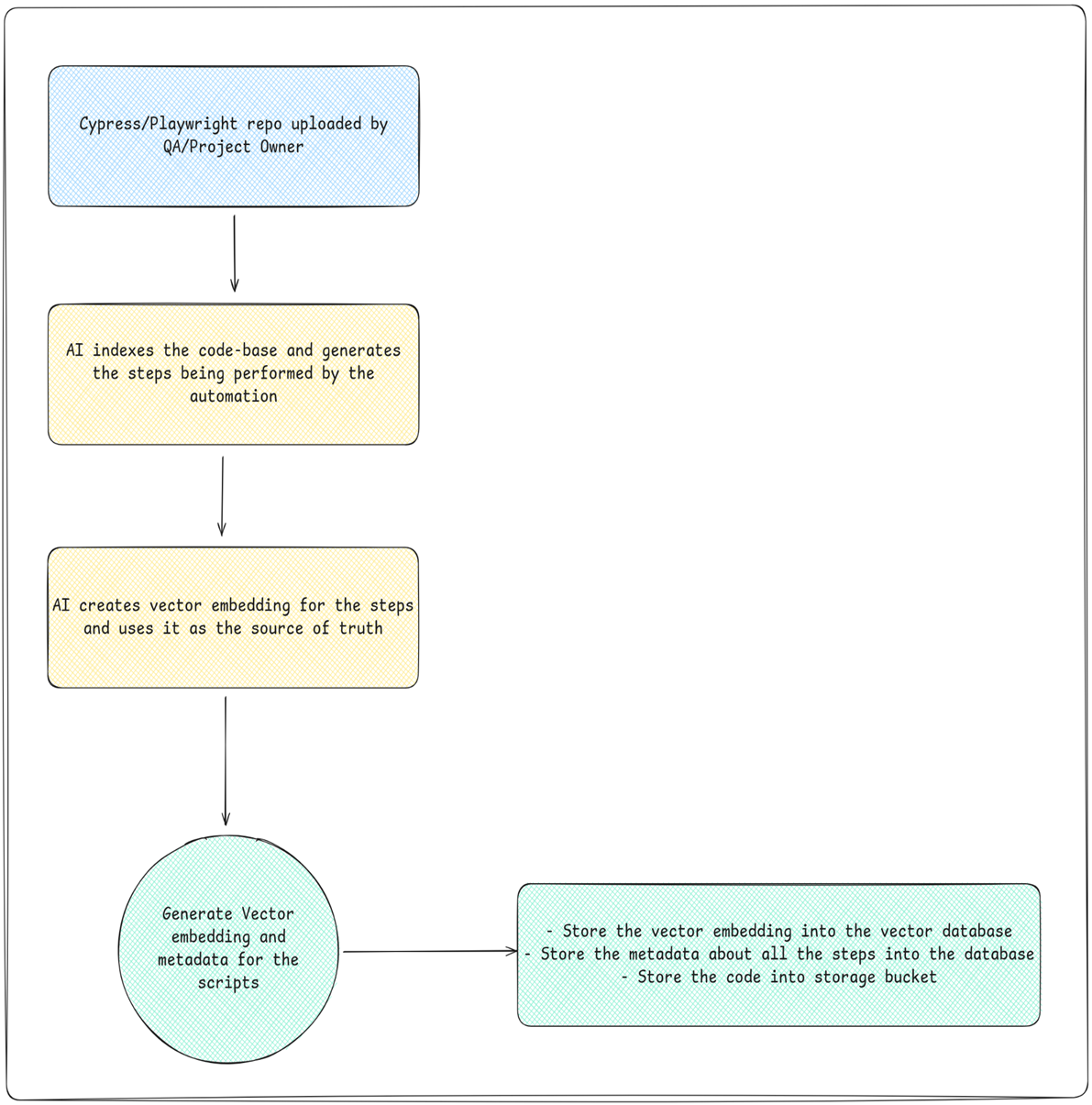 |
|||
| 203 | ||||
| 204 | 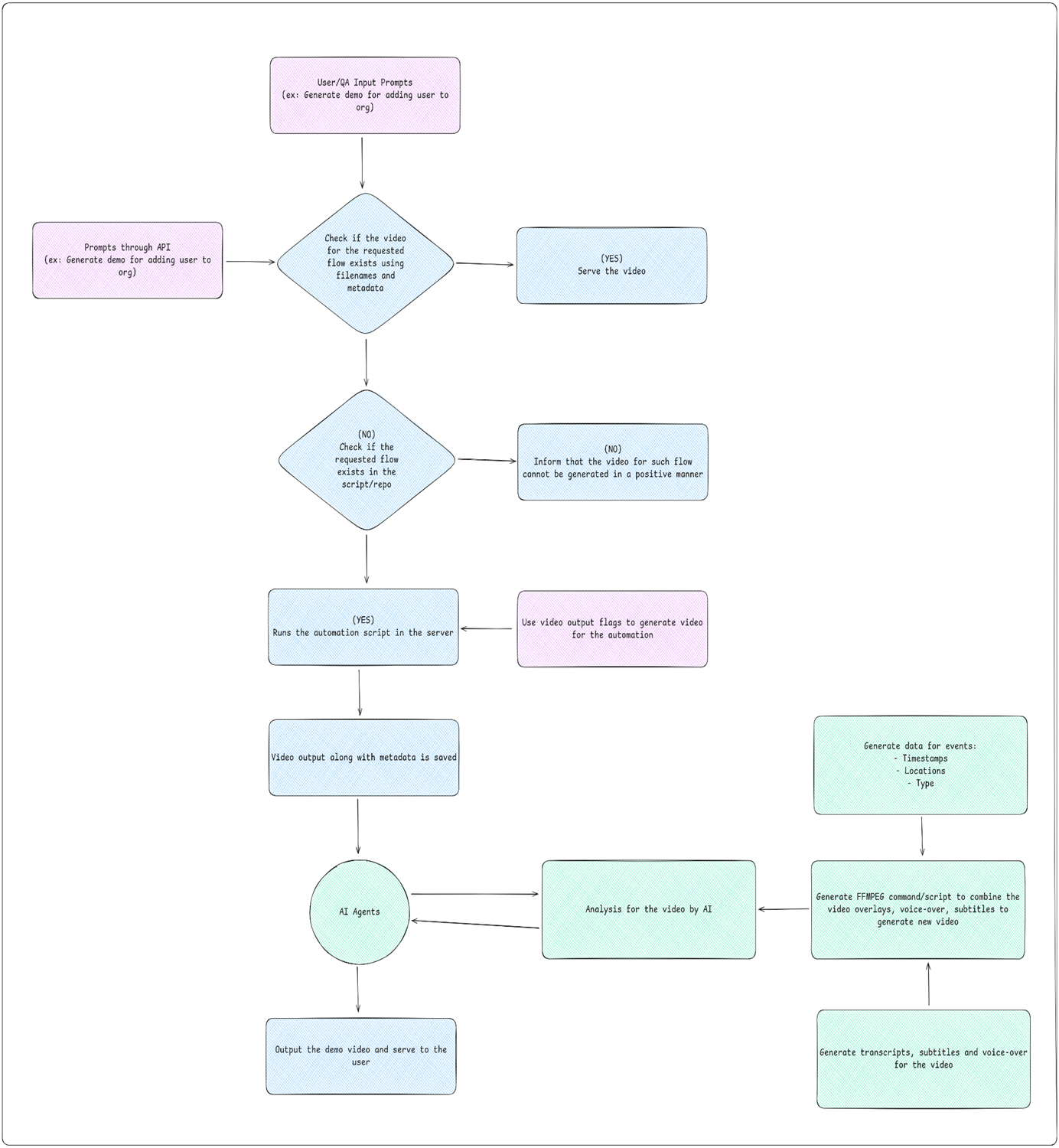 |
|||
| 205 | ||||
| 206 | ## **8\. AI Parts of the Challenge** |
|||
| 207 | ||||
| 208 | 1. Code understanding and generating vector embedding and metadata for the flows |
|||
| 209 | 2. Video analysis (events, transitions, etc) |
|||
| 210 | 3. Video metadata generation |
|||
| 211 | 4. Transcripts, subtitle, voiceover generation |
|||
| 212 | 5. FFMPEG script/command generation |
|||
| 213 | ||||
| 214 | ## **9\. Team plans and goals** |
|||
| 215 | ||||
| 4b2b7b | Melisha Dsouza | 2025-11-03 09:42:27 | 216 | 1. **First 2 weeks goals to achieve: ** |
| f4d7e7 | Melisha Dsouza | 2025-11-03 09:17:23 | 217 | |
| 218 | a. Finalise the backend architecture (monolith/microservices, vector db, cache, docs, ai tools) |
|||
| 219 | ||||
| 220 | b. Finish the boilerplate of the backend |
|||
| 221 | ||||
| 222 | c. Remove unnecessary elements from the UI and finalize the UI |
|||
| 223 | ||||
| 224 | d. Have some testing scenarios for the qa ready |
|||
| 225 | ||||
| 4b2b7b | Melisha Dsouza | 2025-11-03 09:42:27 | 226 | 2. **First month goals to achieve:** |
| f4d7e7 | Melisha Dsouza | 2025-11-03 09:17:23 | 227 | |
| 228 | a. Have all the public and private apis ready |
|||
| 229 | ||||
| 230 | b. Have the code upload -> indexing -> embedding flow ready (at least in some capacity) |
|||
| 231 | ||||
| 232 | c. Have all the test scenarios ready and begin testing for the code upload flow |
|||
| 233 | ||||
| 234 | d. Start working on the video generation and editing part |
|||
| 235 | ||||
| 236 | ## **10\. Sequence Diagram** |
|||
| 237 | ||||
| 238 | 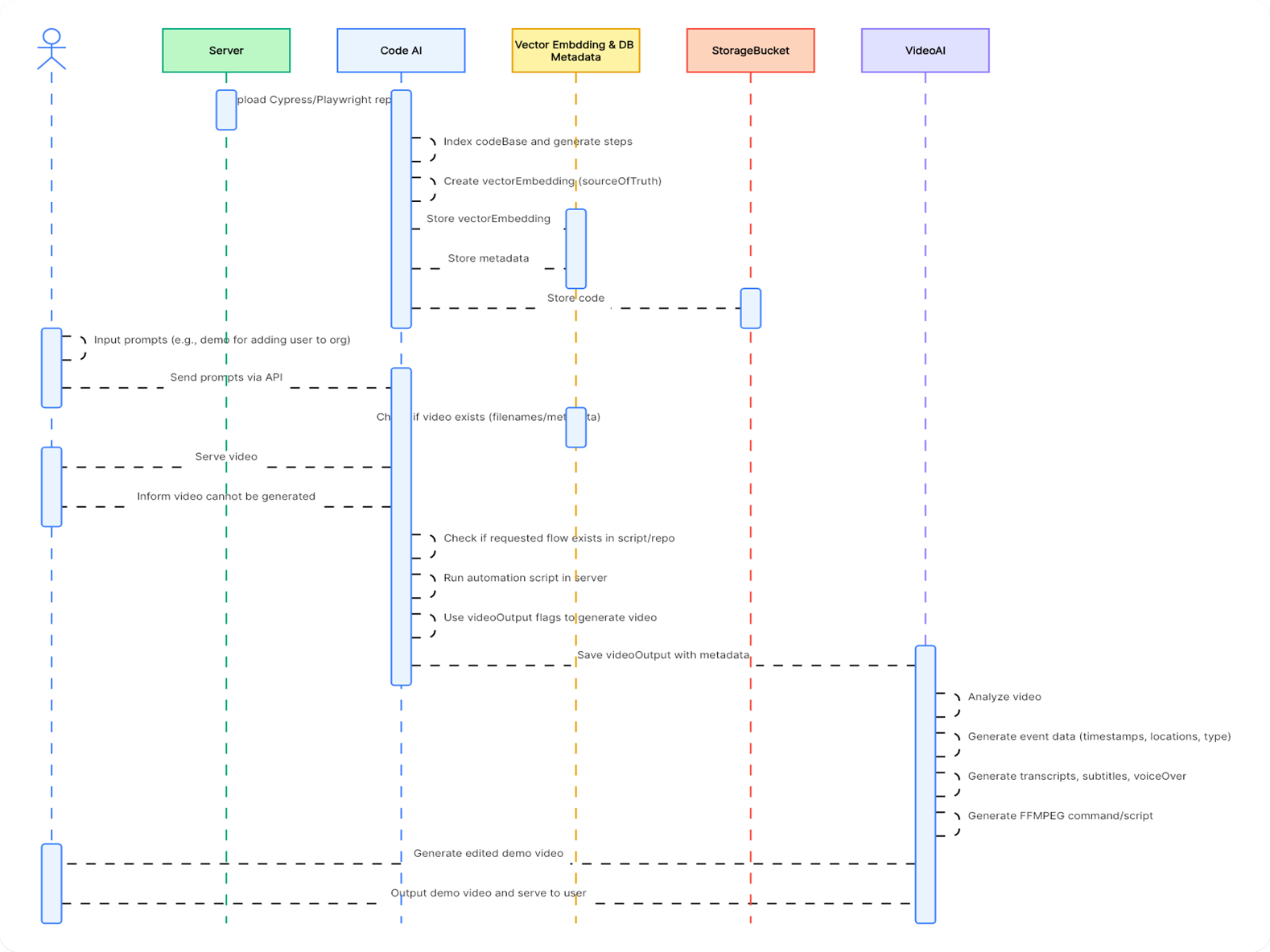 |
|||
| 239 | ||||
| 240 | ## **11\. ERD** |
|||
| 241 | ||||
| 242 | 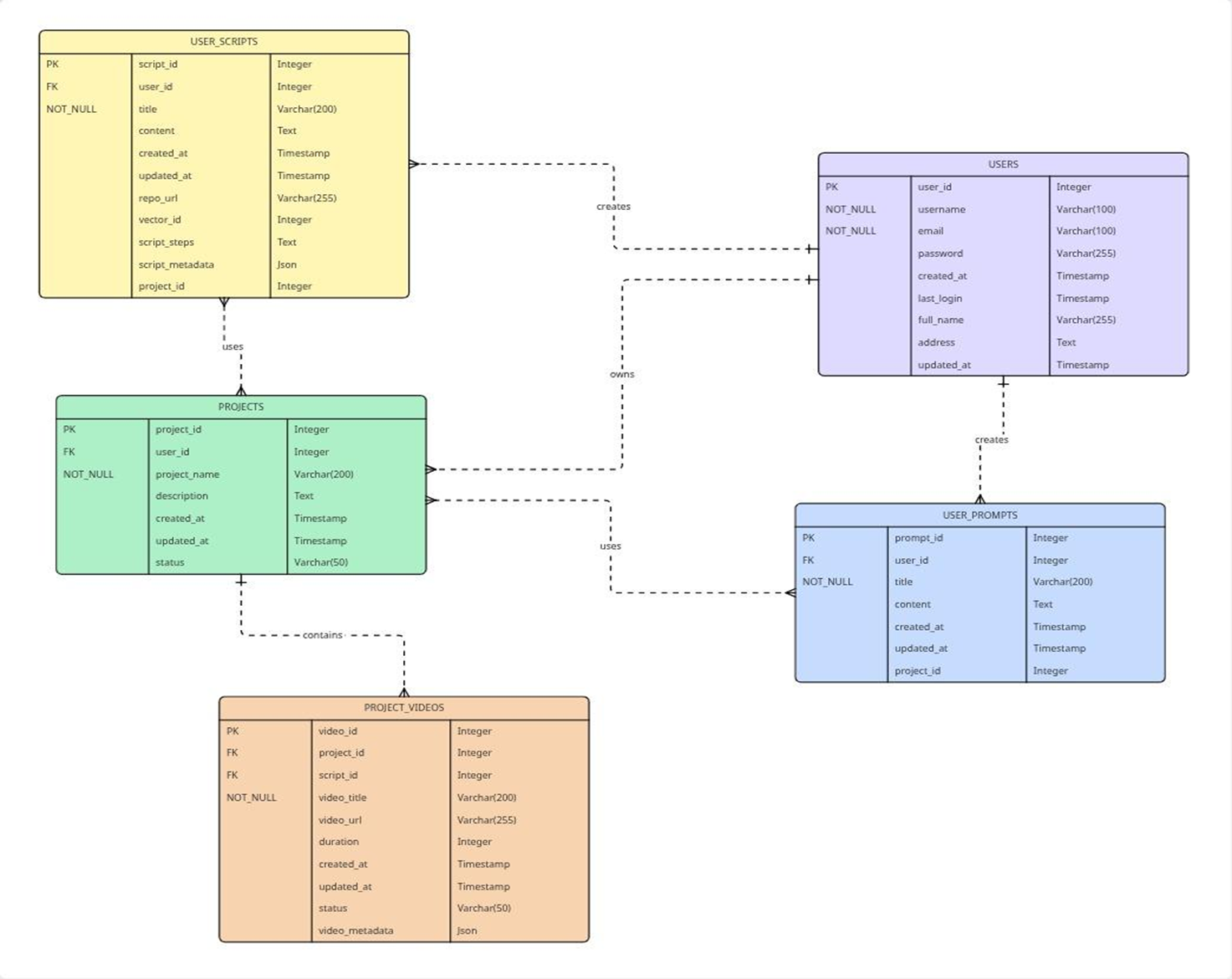 |
|||
| 243 | ||||
| 244 | ## **11\. Technology Stack** |
|||
| 245 | ||||
| 246 | 1. **Frontend:** React |
|||
| 247 | 2. **Backend:** Microservice of Java and Python |
|||
| 248 | 3. **LLM:** Gemini 2.5-FLash, gemini-embedding-001 |
|||
| 249 | 4. **AI Orchestration:** LangChain |
|||
| 250 | 5. **Integrations:** FFMPEG, Automations |
|||
| 251 | 6. **DB:** Postgres (with pgvector) |
|||
| 252 | 8. **Deployment:** Docker, Gitlab CI |
|||
| 253 | ||||
| 254 | ## **12\. Multi-Model Video Analysis Limits: The 6-Minute Test Case** |
|||
| 255 | ||||
| 256 | | Feature / Limit | Gemini API / Vertex AI (Developer/Enterprise) | Gemini Apps (Consumer Chat) - Free Tier | Gemini Apps (Consumer Chat) - AI Pro/Ultra | Workaround for Long Videos (> 1 Hour) | |
|||
| 257 | | -------------------------- | --------------------------------------------- | --------------------------------------------------- | ------------------------------------------------ | ---------------------------------------------------------------------------------------------------------------------------------------- | |
|||
| 258 | | Max Single Video Duration | ≈ 45 mins (with audio) ≈ 1 hour (no audio) | 5 minutes (Total length across all uploaded videos) | 1 hour (Total length across all uploaded videos) | Segmentation & Chaining: Split into 45-minute chunks, analyze, and feed the summary of the previous chunk to the next prompt. | |
|||
| 259 | | Max Total Context Window | 1,048,576 tokens (up to 2M in some configs) | 32,000 tokens (for all input) | 1,000,000 tokens (for all input) | API Only: Use mediaResolution: 'low' parameter, allowing a single video file to be analyzed for up to ≈ 6 hours within the token window. | |
|||
| 260 | | Video Token Rate (Default) | ≈ 300 tokens/second (Visuals + Audio) | Not explicitly published. | Not explicitly published. | Reduce Frame Rate/Resolution before upload, or use the mediaResolution: 'low' API setting to ≈ 100 tokens/second. | |
|||
| 261 | | Max File Size (Upload) | 2 GB per file (via Files API) | 2 GB per video file | 2 GB per video file | Use YouTube URLs (API) or leverage connected cloud services (Apps) to bypass local upload size issues. | |
|||
| 262 | | Max Videos per Prompt | 10 video files | 10 video files | 10 video files | Not the limiting factor for analyzing a single, very long video. | |
|||
| 263 | | YouTube URL Support | Yes (Input via URL supported) | Yes (Connected service) | Yes (Connected service) | Always use for public videos for simpler, faster ingestion. Free tier may have a daily limit. | |
|||
| 264 | ||||
| 265 | | Feature / Limit | Google Gemini (2.5 Pro/Flash API) | ChatGPT (GPT-4o / GPT-4V) | Claude (Opus / Sonnet) | |
|||
| 266 | | ------------------------- | ----------------------------------------------------------------------------------------------- | ------------------------------------------------------------------------------------------------------------------------------- | --------------------------------------------------------------------------------------------------------------------------- | |
|||
| 267 | | Native Video Analysis? | YES. Natively processes both visual frames (sampled) and audio. | NO (Indirect). Cannot process raw video files. Requires a third-party tool or pre-processing to extract frames or a transcript. | NO (Indirect). No direct raw video input. Relies heavily on text transcripts or external tools. | |
|||
| 268 | | Max Single Video Duration | ≈ 1 hour (Token/Context limit). Up to ≈ 6 hours with low-resolution parameter. | Unlimited (Indirectly). The limit is based on the length of the text transcript or the number of frames provided. | Unlimited (Indirectly). The limit is based on the length of the text transcript fed into the massive context window. | |
|||
| 269 | | Context Window Size | 1 Million Tokens (Core model) | ≈ 128K to 200K Tokens (Varies by model version and access point) | 200K Tokens to 1 Million Tokens (Claude Opus/Sonnet) | |
|||
| 270 | | File Upload Method | Direct Upload (API/Apps) or YouTube URL. | Screenshots/Images Only (via GPT-4V/4o). Full videos are not a supported file type in the chat. | Text Transcripts Only. (The model is primarily focused on text and images, not video). | |
|||
| 271 | | How Video Is "Analyzed" | Processes video at ≈ 1 frame/second, plus audio transcription, using a single multimodal model. | Must be analyzed as: 1) A Text Transcript, or 2) A sequence of still images (screenshots). | Must be analyzed as: 1) A Text Transcript (best for long content), or 2) A sequence of still images (less common workflow). | |
|||
| 272 | ||||
| 273 | ||||
| 274 | | AI Model / Platform | Max Total Duration Limit | 6-Minute Video Analysis Result | Token Consumption (Approximate) | |
|||
| 275 | | ------------------------------ | --------------------------------------- | ------------------------------------------------------------------------------------------------------------------------------- | ------------------------------------------------------------------------------------------------------------------------------------- | |
|||
| 276 | | **Gemini Apps (Free Tier)** | 5 minutes (Total per prompt) | **FAIL.** Exceeds the hard 5-minute total limit for the free consumer chat. | ≈ 108,000 tokens (6 mins × 300 tokens/s) – Too high for 32K context. | |
|||
| 277 | | **Gemini Apps (AI Pro/Ultra)** | 1 hour (Total per prompt) | **SUCCESS.** Well within the 1-hour limit. Will use the 1M token context window. | ≈ 108,000 tokens (6 mins × 300 tokens/s) – Easily fits in 1M context. | |
|||
| 278 | | **Gemini API / Vertex AI** | ≈ 1 hour (Default resolution) | **SUCCESS.** Easily analyzable via the Files API or YouTube URL. | ≈ 108,000 tokens (6 mins × 300 tokens/s) – Uses only ≈ 10% of the 1M token window. | |
|||
| 279 | | **ChatGPT (GPT-4o / GPT-4V)** | Indirect / Image count-based | **SUCCESS (Indirect).** Must be uploaded as a full Transcript and/or a few Screenshots. Cannot be uploaded as a raw video file. | **Text Only:** The transcript will be a low token count (≈ 6,000 tokens) and is easily analyzed in the 128K–200K token window. | |
|||
| 280 | | **Claude (Opus / Sonnet)** | Indirect / Token-based (Extremely High) | **SUCCESS (Indirect).** Must be uploaded as a full Transcript. The long context window handles this text easily. | **Text Only:** The transcript is very small relative to Claude’s huge context window (200K–1M tokens), making analysis fast and easy. | |
|||
| 4b2b7b | Melisha Dsouza | 2025-11-03 09:42:27 | 281 | |
| 282 | ||||
| 283 | * **Runway ML** - https://runwayml.com |
|||
| 284 | * **Invideo AI** - https://invideo.io/ai |
|||
| 285 | * **Pika Labs** -https://pika.art |
|||
| 286 | * **Kapwing AI** -https://www.kapwing.com/ai |
|||
| 287 | * **Canva AI Video** -https://www.canva.com/ai-video |
|||
| 288 | * **Genially** - https://www.genially.com |
|||
| 289 | ||||
| 290 | ||||
| 291 | ## **13\. Some API options** |
|||
| 292 | ||||
| 293 | * **Shotstack **– A cloud-video-editing API: you send JSON to control timeline, clips, overlays, text, etc. Shotstack+1 |
|||
| 294 | * **Example**: their “Add Text to Video” guide shows exactly how to programmatically add text overlays. Shotstack |
|||
| 295 | * **Creatomate** – Another API for automated video/image generation & editing via templates. creatomate.com+1 |
|||
| 296 | * **Banuba** – Offers an AI video editing SDK/API (for mobile/web) that supports features like text, overlays, filters. banuba.com |
|||
| 297 | * **Cloudinary** – Has a “Video Editing API” feature that includes adding text overlays and other transformation capabilities. Cloudinary+1 |
|||
| 298 | ||||
| 299 | ## **14\. What you should check / consider** |
|||
| 300 | ||||
| 301 | * Does the API allow text overlay at a specific time, position, animation etc? (Yes — Shotstack has a guide.) |
|||
| 302 | * Does it support your required video formats, size (for social media maybe 9:16) and output quality? |
|||
| 303 | * Are there template / automation capabilities (useful if you’ll generate multiple videos) |
|||
| 304 | * What’s the pricing & scalability (if you’ll generate many videos) |
|||
| 305 | * Does the API require that media is uploaded to their cloud or can you point to external sources? |
|||
| 306 | * **Integration ease:** languages supported (Node.js, Python etc) |
|||
| 307 | ||||
| 308 | ## **15\. The best AI video editing software** |
|||
| 309 | ||||
| 310 | * **Google Veo ** - for end-to-end video creation |
|||
| 311 | * **Runway** - for generative AI video with advanced tools |
|||
| 312 | * **Sora** - for community-driven inspiration and remixing |
|||
| 313 | * **Descript** - for editing video by editing the script |
|||
| 314 | * **Wondershare Filmora** - for polishing video with AI tools |
|||
| 315 | * **Capsule** - for simplifying video production workflows with AI |
|||
| 316 | * **invideo AI** - for social media videos |
|||
| 317 | * **Peech** - for content marketing teams |
|||
| 318 | * **Synthesia** - for using digital avatars |
|||
| 319 | * **HeyGen** - for interactive avatars |
|||
| 320 | * **Vyond** - for animated character videos from a prompt |
|||
| 321 | * **revid.ai** - for AI-powered templates |
|||
| 322 | * **Luma Dream Machine** - for brainstorming with AI |
|||
| 323 | * **LTX Studio** - for extreme creative control |