# **FlowCast: Onboarding Guide** ## **1\. Purpose** **FlowCast** is a centralized service that automatically generates video demonstrations of application features. It records real UI interactions from automation scripts and enriches them with narration, captions, and highlights. FlowCast helps teams save time in preparing client demos, internal showcases, and QA evidence. --- ## **2\. What FlowCast Provides** * **Automated execution of workflows** from application test scripts. * **Screen recording** of real UI flows. * **Narration and captions** generated from mapped actions. * **Feature highlighting** (specific features or full workflows). * **Video packaging and delivery** via GitLab CI/CD artifacts or shareable links. --- ## **3\. Responsibilities of Application Teams** To use FlowCast effectively, application teams must: ### **A. Automation Scripts** * Provide **UI automation scripts** (Playwright, Cypress, or Selenium). * Scripts must: * Be stored in the shared GitLab repository. * Be tagged with feature names (e.g., `login`, `checkout`, `profile_update`). * Be stable and updated when the UI changes. ### **B. Narration Mapping** Maintain a **mapping file** of UI actions → narration text. Example: `click("#login-btn") => "Click the Login button"` `fill("#email") => "Enter your email address"` `fill("#password") => "Type your password"` ### **C. Application Environment** * Provide a **test/staging environment** accessible by FlowCast. * Supply **demo/test accounts** with proper permissions. * Ensure environment stability during recording runs. ### **D. Configuration** * Register your application with FlowCast, including: * Base URL (test/staging). * Authentication flow details. * Available feature tags linked to automation scripts. ### **E. Review & Feedback** * Review FlowCast-generated videos (especially in early stages). * Provide corrections or improvements for narration and terminology. * Report any mismatches between video content and expected workflow. ### **F. Security & Compliance** * Use **non-sensitive test data** in recordings. * Ensure compliance with organizational video-sharing policies. --- ## **4\. Workflow Overview** 1. **Request**: User requests → “Generate demo for *Login* and *Profile Update*.” 2. **Execution**: FlowCast runs the corresponding automation scripts. 3. **Recording**: FlowCast records UI flow, overlays captions/highlights, and generates narration. 4. **Delivery**: Video is packaged and delivered as a GitLab artifact or link. 5. **Review**: Application team validates video before client use. --- ## **5\. Governance** * **FlowCast Service Team** * Maintains the FlowCast platform. * Ensures pipeline integration and service reliability. * Provides onboarding and support. * **Application Teams (Consumers)** * Own automation scripts and narration mappings. * Ensure test environment readiness. * Review and validate FlowCast-generated demos. ## **6\. Tools & Services** 1. **Gemini Flash 2.5/Gemini Flash 2.5 Lite/Gemini Flash 2.5 Pro** a. Code analysis b. Steps and flow generation c. Video analysis d. Generation of timestamps, subtitles, transcripts f. Generate FFMPEG script to edit the video 2. **Gemini embedding model** a. Steps and flow embedding 3. **Gemini Flash 2.5 TTS OR Tortoise TTS** a. Voiceover generation 4. Langchain to build automatic agents that will handle standardized communication with the AI models 5. Minio docker to store video files, audio files, uploaded code 6. Postgres database 8. Postgres plugin pgvector for vector database OR Qdrant vector database OR Weaviate vector database 9. Paid service required Gemini Developer API Paid Tier ## **7\. Project Flow** 1. **Project Flow** a. Cypress/Playwright repo uploaded by QA/project owner b. AI indexes the code-base and generates the steps being performed by the automation c. AI creates vector embedding for the steps and uses it as the source of truth d. Generate Vector embedding and metadata for the scripts i. Store the vector embedding into the vector database ii. Store the metadata about all the steps into the database iii. Store the code into storage bucket 1. **Prompting Flow** a. User/QA Input Prompts(ex: Generate demo for adding user to org ) / Prompts through API b. Check if the video for the requested flow exists using filenames and metadata i. (YES)Serve the video c. Check if the requested flow exists in the script/repo i. (NO)Inform that the video for such flow cannot be generated in a positive manner d. Runs the automation script in the server i. Use video output flags to generate video for the automation e. Video output along with metadata is saved f. **AI Agents** i. Analysis for the video by AI ii. Generate data for events: 1. Timestamps 2. Locations 3. Type iii. Generate transcripts, subtitles and voice-over for the video iv. Generate FFMPEG command/script to combine the video overlays, voice-over, subtitles to generate new video g. Generate the edited demo video h. Output the demo video and serve to the user 3. https://excalidraw.com/#json=4i66sXvJ1zdvc_WPLEtsK,okBD43RRjL2DifWRSahj6g 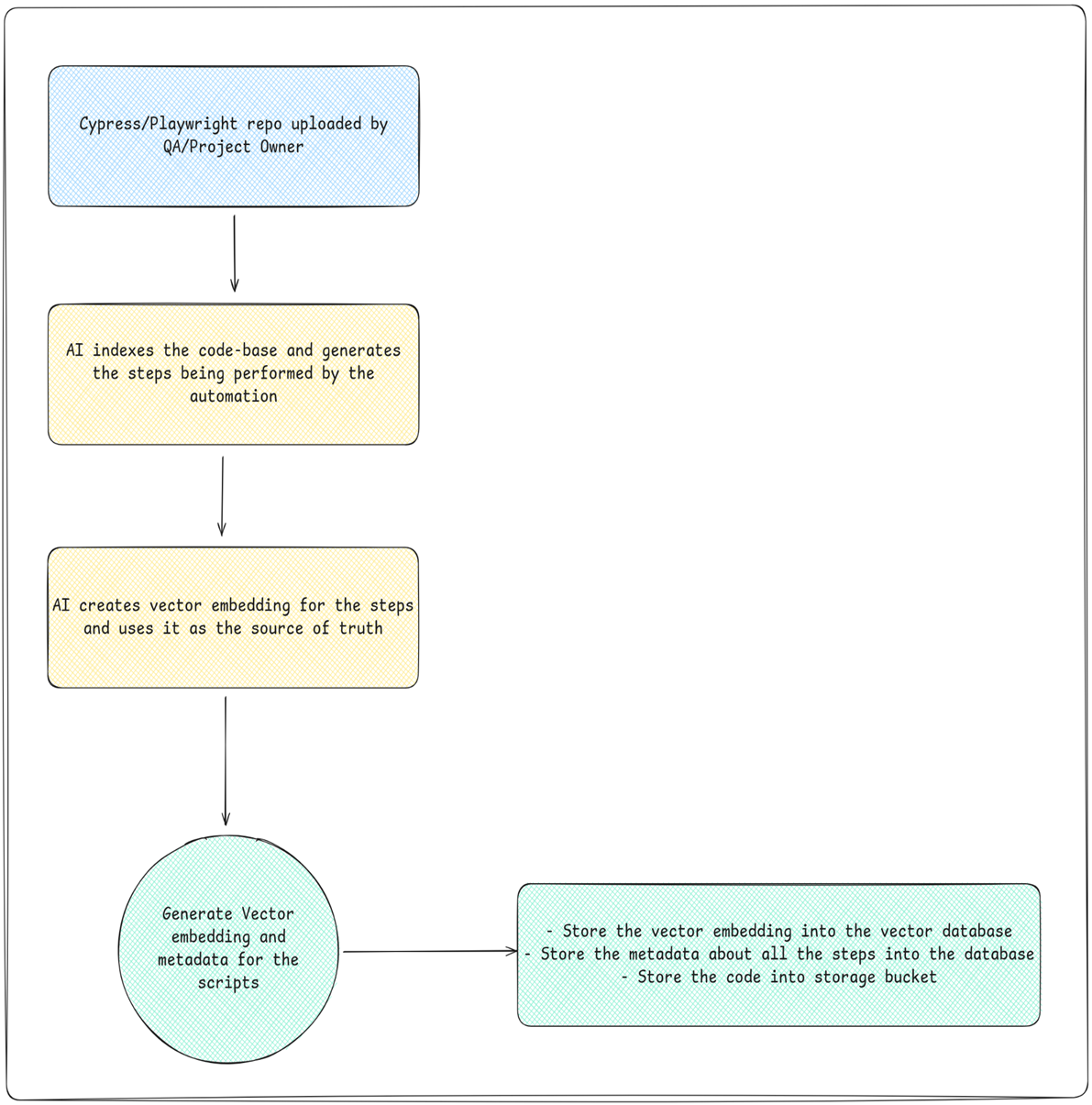 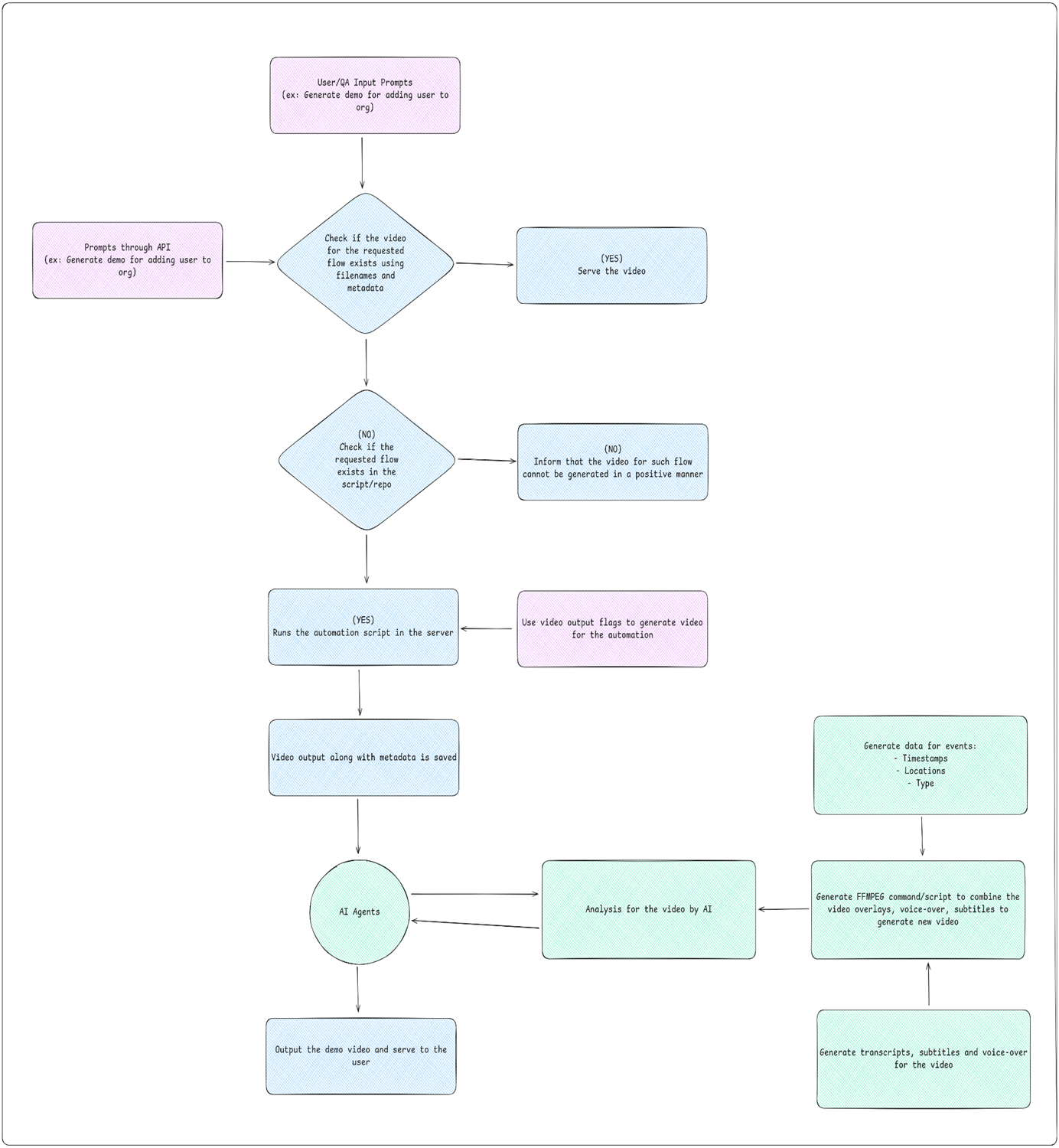 ## **8\. AI Parts of the Challenge** 1. Code understanding and generating vector embedding and metadata for the flows 2. Video analysis (events, transitions, etc) 3. Video metadata generation 4. Transcripts, subtitle, voiceover generation 5. FFMPEG script/command generation ## **9\. Team plans and goals** 1. **First 2 weeks goals to achieve: ** a. Finalise the backend architecture (monolith/microservices, vector db, cache, docs, ai tools) b. Finish the boilerplate of the backend c. Remove unnecessary elements from the UI and finalize the UI d. Have some testing scenarios for the qa ready 2. **First month goals to achieve:** a. Have all the public and private apis ready b. Have the code upload -> indexing -> embedding flow ready (at least in some capacity) c. Have all the test scenarios ready and begin testing for the code upload flow d. Start working on the video generation and editing part ## **10\. Sequence Diagram** 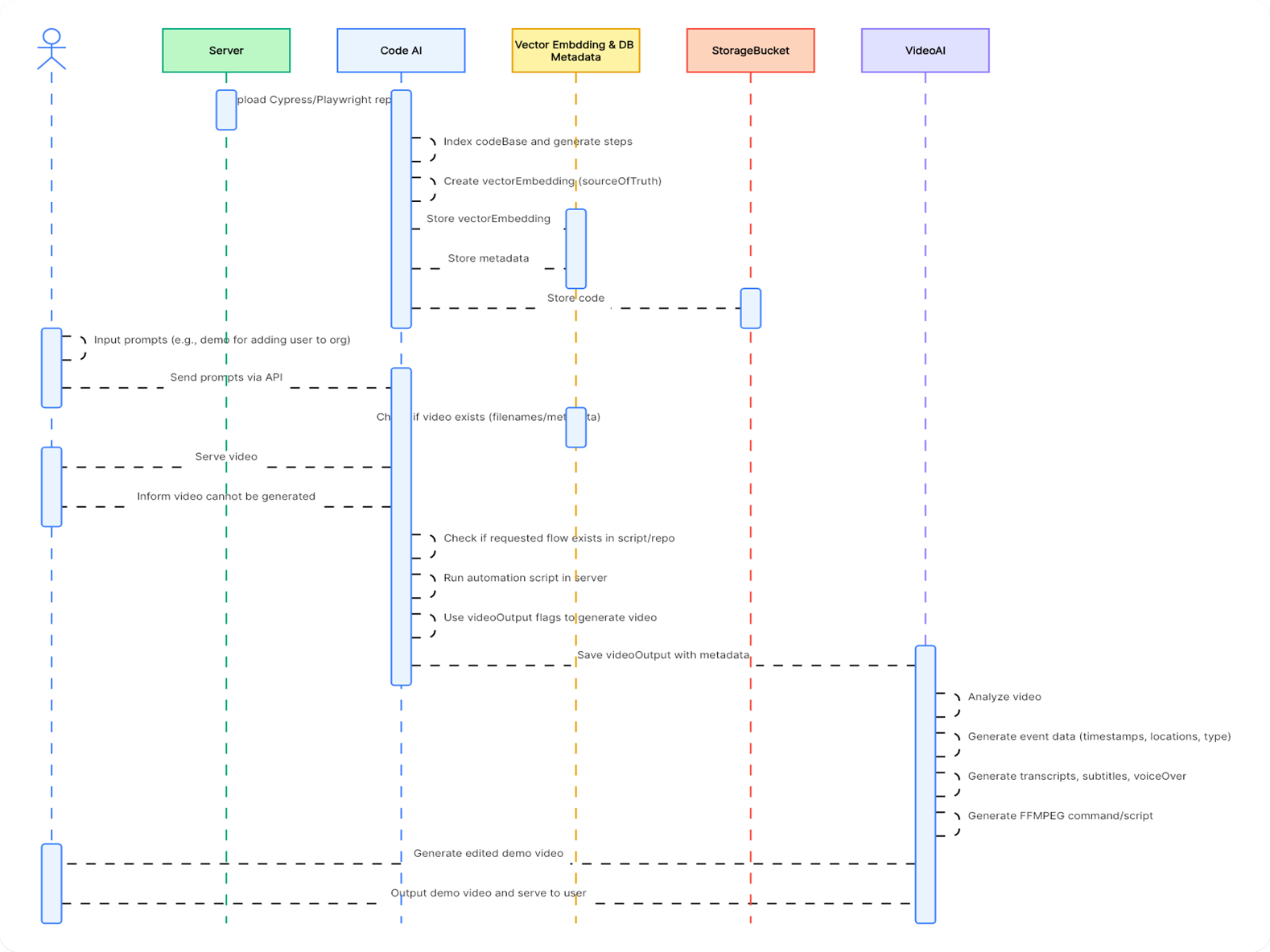 ## **11\. ERD**  ## **11\. Technology Stack** 1. **Frontend:** React 2. **Backend:** Microservice of Java and Python 3. **LLM:** Gemini 2.5-FLash, gemini-embedding-001 4. **AI Orchestration:** LangChain 5. **Integrations:** FFMPEG, Automations 6. **DB:** Postgres (with pgvector) 8. **Deployment:** Docker, Gitlab CI ## **12\. Multi-Model Video Analysis Limits: The 6-Minute Test Case** | Feature / Limit | Gemini API / Vertex AI (Developer/Enterprise) | Gemini Apps (Consumer Chat) - Free Tier | Gemini Apps (Consumer Chat) - AI Pro/Ultra | Workaround for Long Videos (> 1 Hour) | | -------------------------- | --------------------------------------------- | --------------------------------------------------- | ------------------------------------------------ | ---------------------------------------------------------------------------------------------------------------------------------------- | | Max Single Video Duration | ≈ 45 mins (with audio) ≈ 1 hour (no audio) | 5 minutes (Total length across all uploaded videos) | 1 hour (Total length across all uploaded videos) | Segmentation & Chaining: Split into 45-minute chunks, analyze, and feed the summary of the previous chunk to the next prompt. | | Max Total Context Window | 1,048,576 tokens (up to 2M in some configs) | 32,000 tokens (for all input) | 1,000,000 tokens (for all input) | API Only: Use mediaResolution: 'low' parameter, allowing a single video file to be analyzed for up to ≈ 6 hours within the token window. | | Video Token Rate (Default) | ≈ 300 tokens/second (Visuals + Audio) | Not explicitly published. | Not explicitly published. | Reduce Frame Rate/Resolution before upload, or use the mediaResolution: 'low' API setting to ≈ 100 tokens/second. | | Max File Size (Upload) | 2 GB per file (via Files API) | 2 GB per video file | 2 GB per video file | Use YouTube URLs (API) or leverage connected cloud services (Apps) to bypass local upload size issues. | | Max Videos per Prompt | 10 video files | 10 video files | 10 video files | Not the limiting factor for analyzing a single, very long video. | | YouTube URL Support | Yes (Input via URL supported) | Yes (Connected service) | Yes (Connected service) | Always use for public videos for simpler, faster ingestion. Free tier may have a daily limit. | | Feature / Limit | Google Gemini (2.5 Pro/Flash API) | ChatGPT (GPT-4o / GPT-4V) | Claude (Opus / Sonnet) | | ------------------------- | ----------------------------------------------------------------------------------------------- | ------------------------------------------------------------------------------------------------------------------------------- | --------------------------------------------------------------------------------------------------------------------------- | | Native Video Analysis? | YES. Natively processes both visual frames (sampled) and audio. | NO (Indirect). Cannot process raw video files. Requires a third-party tool or pre-processing to extract frames or a transcript. | NO (Indirect). No direct raw video input. Relies heavily on text transcripts or external tools. | | Max Single Video Duration | ≈ 1 hour (Token/Context limit). Up to ≈ 6 hours with low-resolution parameter. | Unlimited (Indirectly). The limit is based on the length of the text transcript or the number of frames provided. | Unlimited (Indirectly). The limit is based on the length of the text transcript fed into the massive context window. | | Context Window Size | 1 Million Tokens (Core model) | ≈ 128K to 200K Tokens (Varies by model version and access point) | 200K Tokens to 1 Million Tokens (Claude Opus/Sonnet) | | File Upload Method | Direct Upload (API/Apps) or YouTube URL. | Screenshots/Images Only (via GPT-4V/4o). Full videos are not a supported file type in the chat. | Text Transcripts Only. (The model is primarily focused on text and images, not video). | | How Video Is "Analyzed" | Processes video at ≈ 1 frame/second, plus audio transcription, using a single multimodal model. | Must be analyzed as: 1) A Text Transcript, or 2) A sequence of still images (screenshots). | Must be analyzed as: 1) A Text Transcript (best for long content), or 2) A sequence of still images (less common workflow). | | AI Model / Platform | Max Total Duration Limit | 6-Minute Video Analysis Result | Token Consumption (Approximate) | | ------------------------------ | --------------------------------------- | ------------------------------------------------------------------------------------------------------------------------------- | ------------------------------------------------------------------------------------------------------------------------------------- | | **Gemini Apps (Free Tier)** | 5 minutes (Total per prompt) | **FAIL.** Exceeds the hard 5-minute total limit for the free consumer chat. | ≈ 108,000 tokens (6 mins × 300 tokens/s) – Too high for 32K context. | | **Gemini Apps (AI Pro/Ultra)** | 1 hour (Total per prompt) | **SUCCESS.** Well within the 1-hour limit. Will use the 1M token context window. | ≈ 108,000 tokens (6 mins × 300 tokens/s) – Easily fits in 1M context. | | **Gemini API / Vertex AI** | ≈ 1 hour (Default resolution) | **SUCCESS.** Easily analyzable via the Files API or YouTube URL. | ≈ 108,000 tokens (6 mins × 300 tokens/s) – Uses only ≈ 10% of the 1M token window. | | **ChatGPT (GPT-4o / GPT-4V)** | Indirect / Image count-based | **SUCCESS (Indirect).** Must be uploaded as a full Transcript and/or a few Screenshots. Cannot be uploaded as a raw video file. | **Text Only:** The transcript will be a low token count (≈ 6,000 tokens) and is easily analyzed in the 128K–200K token window. | | **Claude (Opus / Sonnet)** | Indirect / Token-based (Extremely High) | **SUCCESS (Indirect).** Must be uploaded as a full Transcript. The long context window handles this text easily. | **Text Only:** The transcript is very small relative to Claude’s huge context window (200K–1M tokens), making analysis fast and easy. | * **Runway ML** - https://runwayml.com * **Invideo AI** - https://invideo.io/ai * **Pika Labs** -https://pika.art * **Kapwing AI** -https://www.kapwing.com/ai * **Canva AI Video** -https://www.canva.com/ai-video * **Genially** - https://www.genially.com ## **13\. Some API options** * **Shotstack **– A cloud-video-editing API: you send JSON to control timeline, clips, overlays, text, etc. Shotstack+1 * **Example**: their “Add Text to Video” guide shows exactly how to programmatically add text overlays. Shotstack * **Creatomate** – Another API for automated video/image generation & editing via templates. creatomate.com+1 * **Banuba** – Offers an AI video editing SDK/API (for mobile/web) that supports features like text, overlays, filters. banuba.com * **Cloudinary** – Has a “Video Editing API” feature that includes adding text overlays and other transformation capabilities. Cloudinary+1 ## **14\. What you should check / consider** * Does the API allow text overlay at a specific time, position, animation etc? (Yes — Shotstack has a guide.) * Does it support your required video formats, size (for social media maybe 9:16) and output quality? * Are there template / automation capabilities (useful if you’ll generate multiple videos) * What’s the pricing & scalability (if you’ll generate many videos) * Does the API require that media is uploaded to their cloud or can you point to external sources? * **Integration ease:** languages supported (Node.js, Python etc) ## **15\. The best AI video editing software** * **Google Veo ** - for end-to-end video creation * **Runway** - for generative AI video with advanced tools * **Sora** - for community-driven inspiration and remixing * **Descript** - for editing video by editing the script * **Wondershare Filmora** - for polishing video with AI tools * **Capsule** - for simplifying video production workflows with AI * **invideo AI** - for social media videos * **Peech** - for content marketing teams * **Synthesia** - for using digital avatars * **HeyGen** - for interactive avatars * **Vyond** - for animated character videos from a prompt * **revid.ai** - for AI-powered templates * **Luma Dream Machine** - for brainstorming with AI * **LTX Studio** - for extreme creative control